Participating Frequently
Jun 19, 2018 9:03 PM UTC
Question

Font stlye shows separately in font family

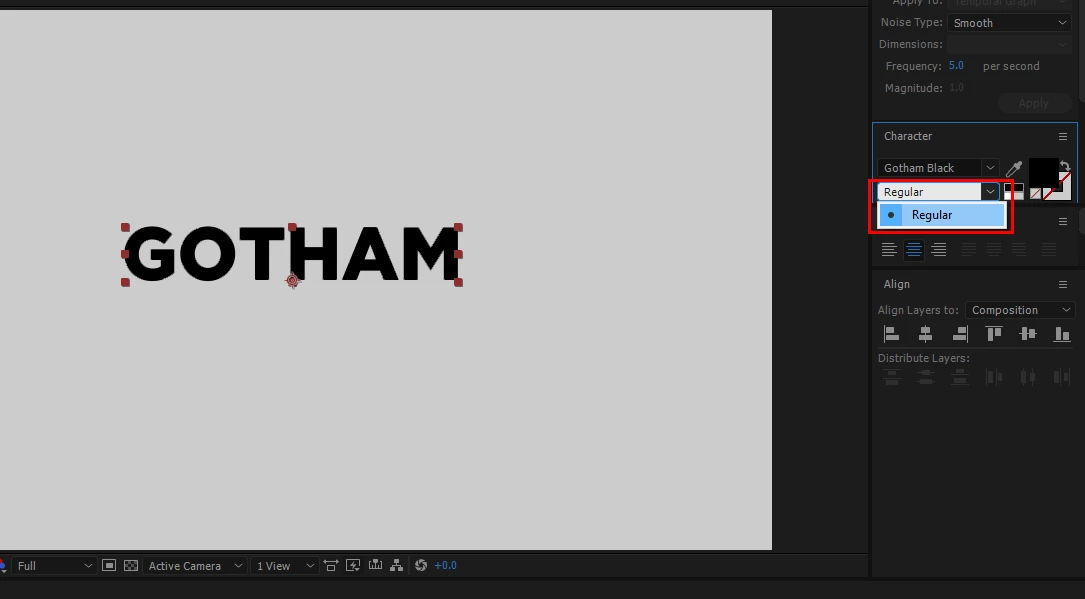
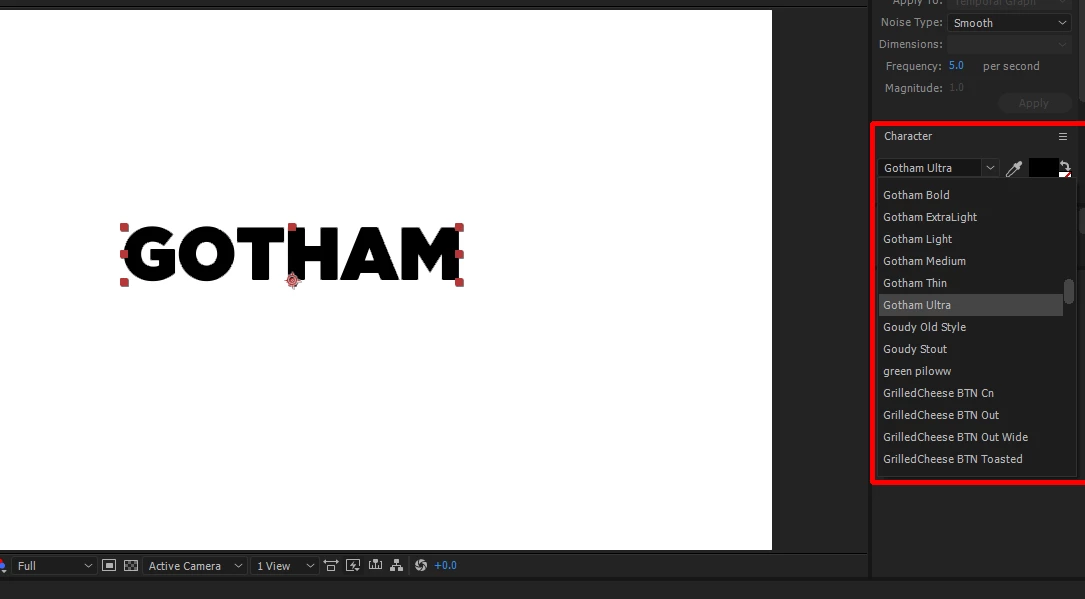
Font style shows up as font family. How can it be show in font style instead of in the font families.

Thanks in advance!
This topic is closed to new replies. Start a new post to keep the conversation going.

13 replies

Participant
Sep 20, 2024 12:35 PM UTC

Hi, 6 years later I'm having the same problem and apparently this has to do with the designer of the font. Have you had much luck with FontForge or found a better way?

Translate
Andrew Yoole
Inspiring
Jun 24, 2018 10:32 AM UTC

Everything above is correct.  The naming structure of every font is controlled by the designer, and has nothing to do with Adobe, or your OS.

There are a gazillion variants of Gotham around, so you could probably find one that has the structure you're after, just a matter of searching.  Or, if you're game, use a Font creation application like FontForge to re-structure the font in the way you require it.

FontForge Open Source Font Editor

Translate
reinweiAuthor
Participating Frequently
Jun 26, 2018 3:51 AM UTC

Hi Andrew, thanks for trying to help.
I never said it has something to do with Adobe or my OS.
I already tried variants of Gotham and unfortunately didn't find the structure I'm after.
I also considered FontForge, just thought there's an easy fix for this.
Thanks anyway!

Translate
reinweiAuthor
Participating Frequently
Jun 19, 2018 10:15 PM UTC

I'm a motion graphics artist and I'm animating kinetic typography.
Attached video here is the ideal setup I'm looking for.
I used montserrat font from the previous project I'm working on.
Now I'm using gotham but it doesn't work the same as montserrat.

By being able to select font style in the right place, it makes my workflow
easier and faster. On the other hand, selecting the font style in the font familyhas the tendency to select other font instead of just the font style

Translate
reinweiAuthor
Participating Frequently
Jun 19, 2018 11:20 PM UTC

The same problem as this post 4 years ago,
how can I combine one font with many styles to show up as one font

so I was wondering if there's a fix for this now that it's 2018

Translate
Legend
Jun 20, 2018 7:47 AM UTC

The "fix" is to get the foundry to change their naming conventions. After Effects (and all installed programs) simply read the font list from the operating system, and that in turn gets the name and family from the font file header.

Translate
Legend
Jun 19, 2018 10:02 PM UTC

It depends how they are configured by the foundry. Some fonts are identified in the headers as part of a family, some are not. You can also end up with weights from different vendors on the same system, and those should never be grouped as a family because the glyphs are different.

Translate
reinweiAuthor
Participating Frequently
Jun 19, 2018 10:23 PM UTC

Hi Dave,
thanks for the reply. I think there's a misunderstanding with my post. I hope it's cleared with my current reply on this post.

I have the same problem with other fonts like Helvetica, Frutiger, Typograph Pro.

Unlike Montserrat and Myriad Pro, they work fine.

So it would really help me if I figured out this problem!

Translate
Dave_LaRonde
Inspiring
Jun 19, 2018 9:38 PM UTC

If you did that, you couldn't tell the difference between the light and extra bold versions.... and who wants that?

Translate
reinweiAuthor
Participating Frequently
Jun 19, 2018 10:17 PM UTC

Hi Dave, thanks for replying.
please refer to my reply at the bottom, thanks!

Translate