Participant
September 12, 2023
Answered

Font weight in number slider control

  • September 12, 2023
  • 2 replies
  • 1157 views

I have created a slider control to count down from "£20,000 remaining" to "0 remaining" however the font is in a bold weight but I would like the word "remaining' to be in a light weight. 


Here is my code:
"£" + effect("Slider Control")("Slider").value.toFixed(2)+" "+ "remaining"


Any ideas? New at expressions and coding!

Thanks

This topic has been closed for replies.
Correct answer Rick Gerard

You can currently get.styleAt(Character Index, Time), but you cannot set.styleAt(Character index. time). It is currently a feature request, but it has not yet been implemented.


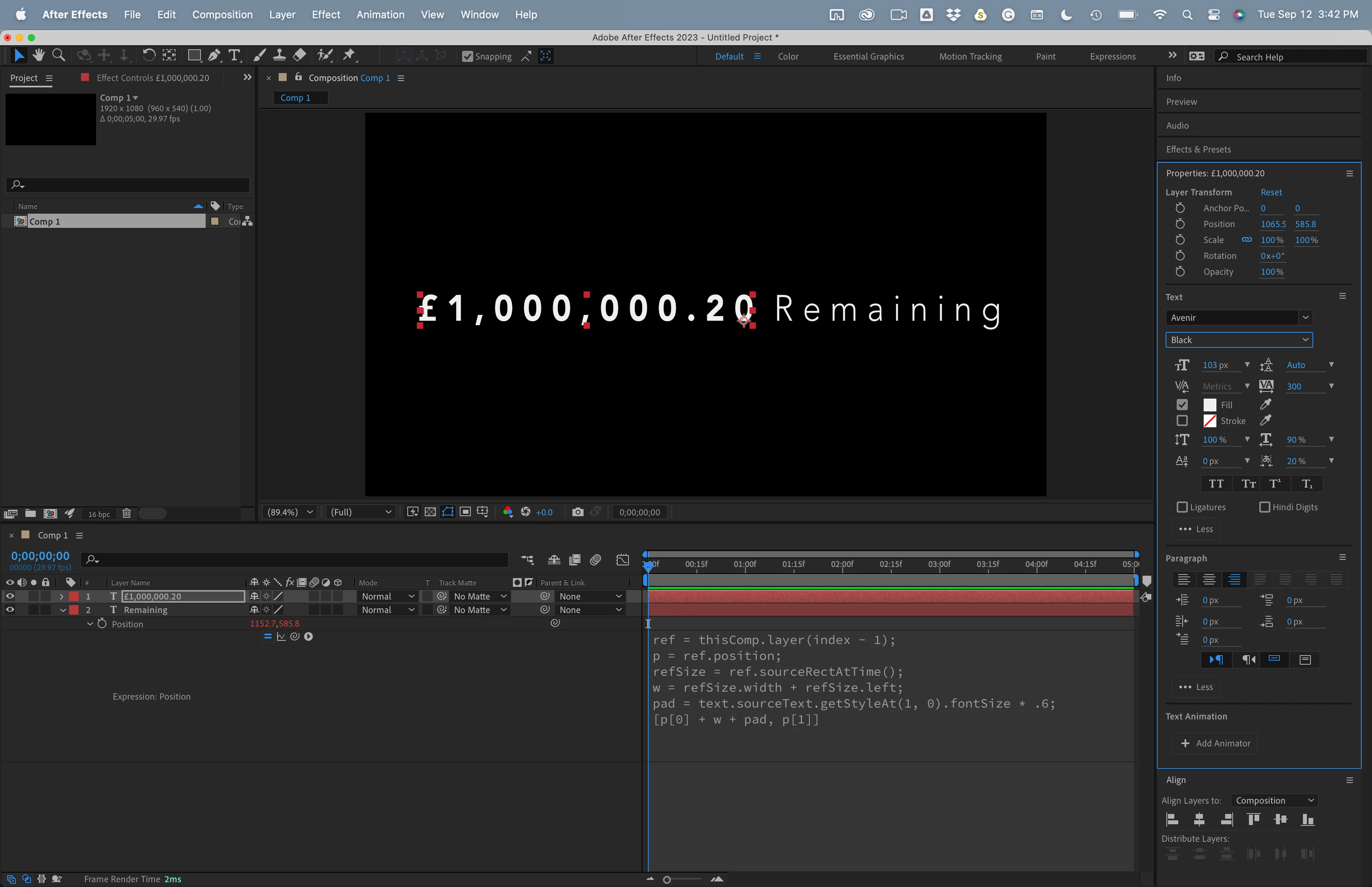
The best option would be to use two text layers and sourceRectAtTime() to line up the remaining text layer with the text layer containing the number string controlled by the slider. If the top layer is the counter and it is right justified, the bottom layer is the Remaining layer, and the baseline shift for both layers is the same, something like this expression for Position on the bottom layer will work:


ref = thisComp.layer(index - 1);
p = ref.position;
refSize = ref.sourceRectAtTime();
w = refSize.width + refSize.left;
pad = text.sourceText.getStyleAt(1, 0).fontSize * .6;
[p[0] + w + pad, p[1]]


You can change the multiplier on the pad variable. Sixty percent (* .6) is a good starting value for most fonts. 
 

2 replies

Participant
September 25, 2024

I need to do the same with a % counter where the numbers are rounded to whole numbers. The slider control increases the % number and the line below it using trim paths.

Could you explain in more detail how i can turn that % into a thinner font using the code below? 

Thanks


Participant
September 25, 2024
Screenshot_2024-09-25_at_10-44-33.png
Rick GerardCommunity ExpertCorrect answer
Community Expert
September 12, 2023

You can currently get.styleAt(Character Index, Time), but you cannot set.styleAt(Character index. time). It is currently a feature request, but it has not yet been implemented.


The best option would be to use two text layers and sourceRectAtTime() to line up the remaining text layer with the text layer containing the number string controlled by the slider. If the top layer is the counter and it is right justified, the bottom layer is the Remaining layer, and the baseline shift for both layers is the same, something like this expression for Position on the bottom layer will work:


ref = thisComp.layer(index - 1);
p = ref.position;
refSize = ref.sourceRectAtTime();
w = refSize.width + refSize.left;
pad = text.sourceText.getStyleAt(1, 0).fontSize * .6;
[p[0] + w + pad, p[1]]


You can change the multiplier on the pad variable. Sixty percent (* .6) is a good starting value for most fonts. 

 

MeechpeeAuthor
Participant
September 13, 2023

Thanks thats done the trick, appreciate the help!