


Inspiring
November 30, 2023
Answered

For Loop

  • November 30, 2023
  • 2 replies
  • 320 views

I am trying to make a grid (6 columns) as I duplicate layers, when I reach copy 7 it is positioned below the first ones. I achieved it with an if else expression but it is manual, I have to replicate the statement every 6 layers for it to repeat. "number" I added with the index of the layer.
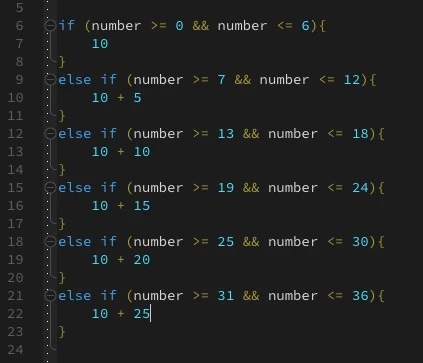


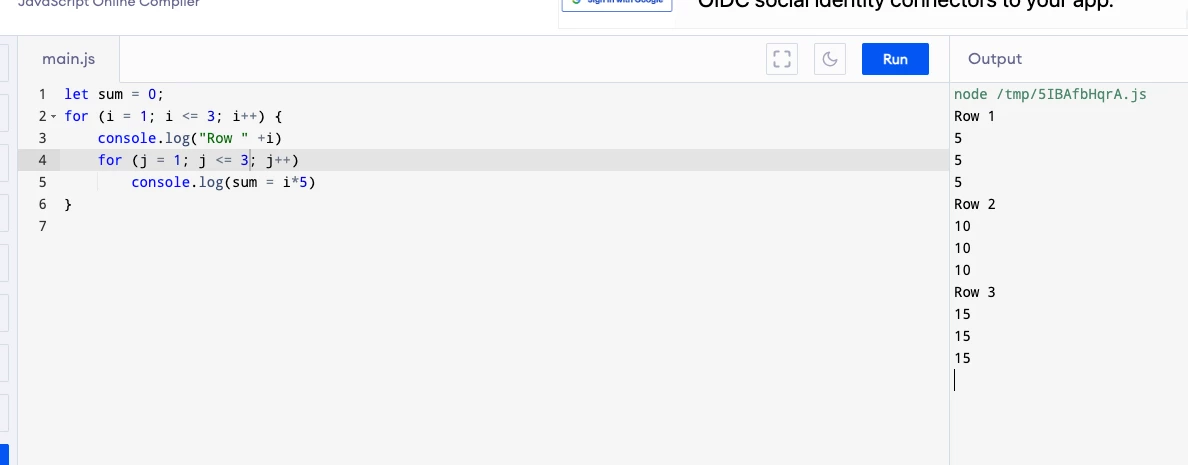
basically I have the loop in javascript but I don't know how to integrate it to the Y axis position, I want the first row 1 (layer 1 to 6) to be at 5 pixels, row 2 (layer 7 to 12) to be 10 px and so on

This topic has been closed for replies.
Correct answer Dan Ebberts

I'm not sure this formula is exactly right for your situation, but it should get you close:

numCols = 6;
n = index - 1;
col = n%numCols;
row = Math.floor(n/numCols);
x = 10 + col*5;
y = (row+1)*5;
[x,y]

2 replies

Dan Ebberts
Community Expert
Dan EbbertsCommunity ExpertCorrect answer
Community Expert
November 30, 2023

I'm not sure this formula is exactly right for your situation, but it should get you close:

numCols = 6;
n = index - 1;
col = n%numCols;
row = Math.floor(n/numCols);
x = 10 + col*5;
y = (row+1)*5;
[x,y]
Mathias Moehl
Community Expert
Community Expert
November 30, 2023

"Math.ceil(number/6)" should give you the row number (starting with 1).


Hence, you want something like

5 + 5 * Math.ceil(number/6)

Mathias Möhl - Developer of tools like BeatEdit and Automation Blocks for Premiere Pro and After Effects