


Jan 8, 2020 7:07 PM UTC
Answered

Frame Rate Issue in After Effects - Video not synced when rendered to H264

So my kids and I wanted to create a Star Wars video with lightsabers. We recorded the video, imported in after effects, and then I went frame by frame adding lightsaber effects. It took a a lot of hours to complete. We got all excited when it was complete, and I rendered the movie to h264. When watching it, the audio was not synced and the light sabers were off. After figuring things out, I noticed the composition frame rates for both the footage and the light saber effects are at 29.37 fps. Everything is in sync when playing it in after effects. But after I render it (which looks like it renders to 29.97), everything is off.


So I attempted to change the composition frame rates to 29.97 for both footage and lightsaber effects. The audio is synced but the light sabers are still off. Is there a way to get this rendered without needing to go back and do the light sabers all over again?
This topic is closed to new replies. Start a new post to keep the conversation going.
mike cardeiroCorrect answer
Inspiring
Jan 9, 2020 3:57 PM UTC

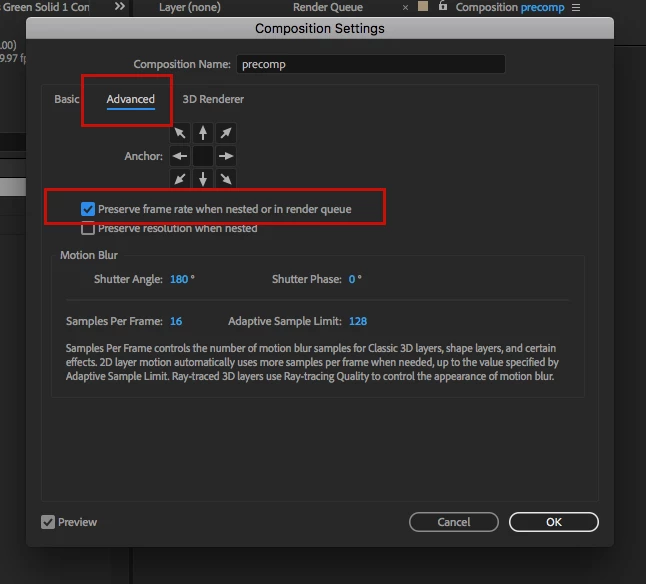
the other thing to try is make your comp in ae 29.97.  Precomp your effects and footage.  Make the precomp 29.37.  Go into the comp settings of the precomp, click on the advanced tab and check "preserve framerate when nestes or in render que".  Then render the mater 29.97 comp


5 replies

mike cardeiroCorrect answer
Inspiring
Jan 9, 2020 3:57 PM UTC

the other thing to try is make your comp in ae 29.97.  Precomp your effects and footage.  Make the precomp 29.37.  Go into the comp settings of the precomp, click on the advanced tab and check "preserve framerate when nestes or in render que".  Then render the mater 29.97 comp


Translate
Participant
Aug 19, 2024 5:37 AM UTC

My friend, I know it's been 4 years, but your post just saved my heart and a whole day's roto work!!! Never know there's a button hidden there to fix this bloody frame rate issue! THANK YOU SO SO MUCH!!!

Translate
Inspiring
Jan 9, 2020 3:49 PM UTC

Unless it's a typo, I would say the 29.37 frame rate is the problem.

I would transcode the original footage to 29.97 using media encoder, then add effects in a 29.97 comp in after effects.

Translate
Ko.Maruyama
Community Expert
Community Expert
Jan 8, 2020 8:30 PM UTC

"frame by frame" how?

Is it possible tht you have mixed frame rates in a precomp somewhere that has keyframes or stretched timing?  Make sure that your precomps maintain their framerate even when nested.

Changing your frame rates after you've painted may change the sync completely!

Translate
Participant
Jan 8, 2020 11:03 PM UTC

This thread relates to my question as well, I think.  But I'm a noob, so please forgive me if this is a breach of protocol.  I created a couple of comps at 24fps, when I created them.  I subsequently realized that all the rest of the video that I plan to include along with my comp's, are at 60fps.  Can I just go into the comp setting and change the fps to 60 now?  Or do I have to do something else to make the timings work?   From Ko's answer above, I think I need to edit the fps of every pre-comp inside the main comp, but if I do that, and make everything 60fps, and leave the duration the same, will AE make everything nice?   (and I won't include any audio in the comp, and just add it later in Premiere.  


Thanks,  


Jeff 

Translate