
Participant
March 1, 2017
Answered

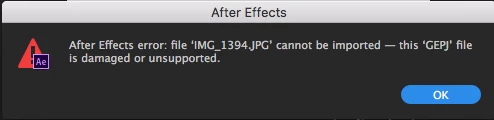
GEPJ error?

  • March 1, 2017
  • 10 replies
  • 14301 views

Hi all,

I came across this error when I was opening an After Effects file my co-worker made.  It gave me this error for all the photos in the project.

We're both using version 14.0.1.5


Has anyone ever seen this error?  JPEG backwards?

Thanks!

UPDATE: I just now figured out how to fix it (it was a permissions issue since we're using a SAN), but I was still curious if anyone had seen this GEPJ error.  Weird.

    Correct answer deans67202452

    For anyone who encounters this error in the future:

    The solution is ensure that your JPEGS are in RGB, having CMYK will force this error when trying to import into AE

    10 replies

    FLYP
    Inspiring
    December 23, 2024

    Hello there,

    Since some people still appear to have the issue, I wanted to leave my solution on here, as it might help someone. Mac user here.

    I too was having issues when importing these "jpegs" into After Effects and Photoshop, and wasn't able to convert them to other image formats neither

    But since it worked on the Finder, I tried opening them up directly with the Preview, hit Export, choose another file format, and lo and behold - it worked!

    Happy designing!

    Participating Frequently
    June 1, 2023

    We use Dropbox and If files are unsynced and synced again this can happen. If it's just 1 image. open it and resave. I think it's a colour profile thing rather than colour space (RGB/CMYK). Indesign does the same thing sometimes if you place an RGB image in without a profile (screenshots etc). Don't get me started on who places screenshots into jobs. Screen Shot 2023-06-01 at 10.34.04 am fills me with dread.

    Inspiring
    June 30, 2022

    I encountered this with files stored on box.com.

    kikamac
    Participant
    February 21, 2023

    I'm having this issue using files stored on dropbox. were you able to find a solution?

    Participant
    February 5, 2024

    I too am having this issue. Made my files offline for storage purposes and now made them online to edit the AE file and all my photos have this issue.  There are dozens so I don't have time to do something to each of them. Is there a quick fix?

    Participant
    July 21, 2021

    My JPEG was a photo taken by a third party on their iPhone, and then sent to me via WhatsApp desktop. Every image that they sent gave the same issue.

    I tried opening in Mac 'Preview' and resaving the image, but it gave the same error.

    I then opened it in Photoshop and saved as a .PSD. After Effects then imported it with no issues. Larger file, but solved the issue

    Participant
    July 21, 2021

    Further to the above... ALL the images were RGB (because they were taken by a phone!) and I did not change that.

    I've just opened another file in PS and re-saved the JPEG. In the JPEG Options dialogue, the Format Options showed 'Progressive' chosen. I've not seen that before, so I changed it to 'Baseline (Standard)' [because always go 'Standard'] and AE imported it with no issues.

    Inspiring
    July 30, 2020

    I realize this is coming WAY later than most posts, but I'm having this issue and it can't be the CMYK/RGB thing.  If I import the photo as if it's a NEW import, the photo comes in fine.  It's only when I try to replace footage that it happens.  This seems odd that it would unsupported for reconnecting but not a fresh import.

    Known Participant
    January 8, 2019

    And what if you're getting this error on an RGB jpeg? Nothing I do will change this. Is it down the the resolution of the image? I've tried copying the content into a new PSD document, and re-saving as a jpeg. Nothing I do works? Any advice?

    Participant
    July 27, 2017

    Yup, for me this was CMYK issue. I mean seriously, it was photoshop I was saving the images in, so how Adobe can't get a more helpful error message or even convert the colour space automatically is beyond me.

    deans67202452Correct answer
    Participating Frequently
    March 22, 2017

    For anyone who encounters this error in the future:

    The solution is ensure that your JPEGS are in RGB, having CMYK will force this error when trying to import into AE

    Participant
    November 13, 2024

    This should not be marked as resolved. I am getting the same error and all my images are in RGB.

    P.M.B
    Legend
    March 2, 2017

    All part of the great new direction Adobe products are moving in.

    ~Gutterfish
    Mylenium
    Legend
    March 1, 2017

    Presumably some odd programmer's humour. No idea what it could be an acronym for, but it might be interesting to find out. Otherwise it could be a parsing error of course.

    Mylenium

    Inspiring
    June 30, 2022

    It's just JPEG in reverse.