

Known Participant
June 6, 2024
Answered

Getting this error when I update an application

  • June 6, 2024
  • 3 replies
  • 1953 views

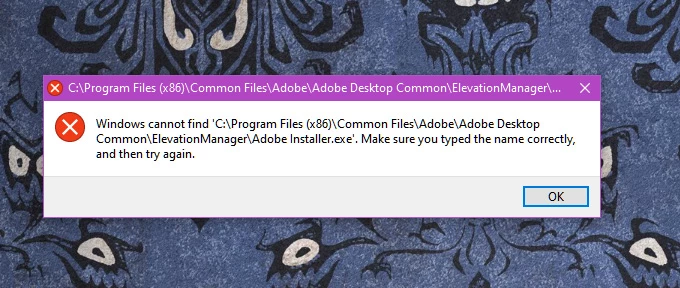
I got this when I tried to update the latest AF.  This happends randomly on any update from Adobe.  I have to reinstall the cloud app to fix it.
Correct answer Naresh_yadav3267

Thanks a lot mate, I was facing trouble in installing/updating apps via creative cloud desktop app, I searched their help page but nothing helpful, all I was lookig for is the "Adobe Installer.exe" and by pasting it in the folder->"C:\Program Files (x86)\Common Files\Adobe\Adobe Desktop Common\ElevationManager". My probelem solved.

3 replies

mraxenic
Participant
September 27, 2025

Here is the solution that worked for me.

1. Download the Adobe Creative Cloud Uninstaller from here

2. Run the program when downloaded

3. Select 'repair'

Wait for it to repair the app. Uninstalling and reinstalling didn't work till I did this.

Participant
March 8, 2025

I made a backup at my webspace.

You can download there and put it back: https://nees64.home.xs4all.nl/Adobe%20Installer.exe 


Greetings Nees

Participant
April 7, 2025

Thanks bro!!!

Works fine...

Participant
April 13, 2025

You're welcome.

Glad I could help.

ToolfarmJP
Community Expert
Community Expert
June 7, 2024

You check Adobe Installer.exe exits in the directory of C:\Program Files (x86)\Common Files\Adobe\Adobe Desktop Common\ElevationManager. If not, you need to restall Adobe desktop tool.


https://creativecloud.adobe.com/apps/download/creative-cloud


https://helpx.adobe.com/download-install/kb/creative-cloud-desktop-app-download.html


tony_1968Author
Known Participant
June 7, 2024


quote

You check Adobe Installer.exe exits in the directory of C:\Program Files (x86)\Common Files\Adobe\Adobe Desktop Common\ElevationManager. If not, you need to restall Adobe desktop tool.

By @ToolfarmJP


That is what I stated I do.  What causes this? Win10 is my machine.

Above The Firehouse Podcastwww.abovethefirehouse.com
nishu_kush
Community Manager
Community Manager
June 25, 2024

As I understand it, you get this error whenever you update an Adobe app. To fix it, you need to reinstall the app. Is that correct? Does it happen with all the apps or just After Effects? Is this a work computer or a personal one?

Let us know, we're here to help.


Thanks,

Nishu
