MahaB82A
April 5, 2026
Question

Glass Effect in Effects in Presets

  • April 5, 2026
  • 2 replies
  • 147 views

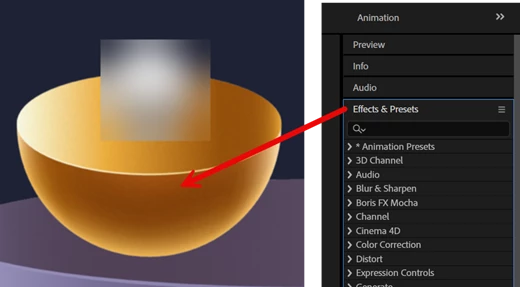
Is there any element in Effects in Presets to turn this object into glass like? What I want is to make this object into transparent to see what is inside it.



    2 replies

    Nishu Kushwaha
    Community Manager
    Community Manager
    April 6, 2026

    If you're looking to create an object that looks and behaves like glass, following tutorials should help:

    https://adobe.ly/47GhVEH


    https://adobe.ly/41Plll3


    Let us know how it goes.


    Thanks,

    Nishu


    ShiveringCactus
    Community Expert
    Community Expert
    April 6, 2026

    If you wanted to add a glass square like you show here, that is easiest to achieve with an adjustment layer, with a mask and a blur effect.

    If you’re wanting the whole bowl to be made of glass, you’ll need to use a Substance material.  Fortunately there is one free glass material on Adobe’s substance store:

     https://substance3d.adobe.com/assets/allassets/96d380b502e41e266167a155d117b7922ba6037d?assetType=SubstanceMaterial&free=true


    But if you want to combine the square with cutting through the bowl, then you’ll need two bowls.  One with the glass texture and then two layers with the calculations effect, to copy the bowls. These layers can respond to track mattes, so you create your square as a track matte (for the glass bowl), and make the non glass bowl use it inverted.