Participant
January 7, 2018
Answered

GPU effects error

  • January 7, 2018
  • 10 replies
  • 26632 views

Whenever i apply the lumetri color effects this happens...
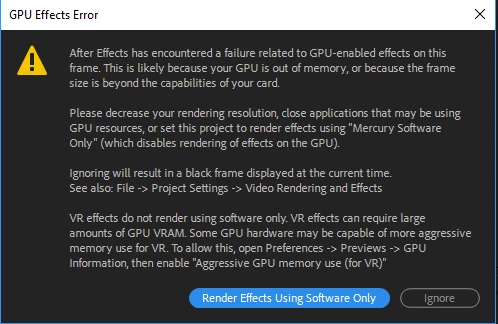
I've never had this problem before and I've been using AE for more than 2 years now, any solutions ?

Correct answer ToolfarmJP

Hello,

The effect requests more size of the memory on your GPU. You change your graphic card which is more powerful or change the use of CPU instead of GPU in your preference of After Effects although it becomes slow.

10 replies

Participant
May 11, 2023

I cant believe the owners of this software cant give an answer, dont pay for this ppl pls

Participant
September 23, 2021

my problem is kind of [?] similar. when i go to the GPU informations, it shows that the total GPU memory ia 1.96 GB and requires 2GB or greater, but my pc has exactly 2GB, so why does it show less? if anyone knows the answer, please help! thank you muchs!


Participant
July 12, 2021

In my case there was a problem with a *.webm file. I converted it to a *.mp4 and the error was gone. Hope it helps...

Ando0o0
Inspiring
June 22, 2021

I just got this error on a comp that wasn't too crazy and I've had heavier comps in the past however the software render option is actually not good if you have effects that require GPU rendering. I did solve the error which was disabling a lumetri color effect on one of the layers (the effect was raising the exposure by 1 stop and had a blur effect below it). Toggle it on and off and the error comes up again. So most likely it is a color effect since adobes lumetri color is trash anyways. The answer on this thread is ludicrous since no one is going to buy a new GPU for an after-effects error so just want to help by saying toggle your effects first before buying anything new. 

July 7, 2021

Thats right!

Participant
July 5, 2020

Im  facing the same error but i think my built is capable of taking load of ae


Specifications:

1060ti 6gb 

I5 8600

8gb 3200mhz

Please can you help me out?

Participant
February 26, 2020

I've had my GPU for 6 years, a GTX 770 with 2bg ram. And I've only had this error a handful of times when my workload was very extensive when I was working with 3D and shadows, etc. Now I'm just trying to render a simple JPEG and it keeps giving me this error. I've also been having problems with the render, the photo doesn't render properly and has a lot of glitchy artifacts on it. Is my GPU starting to die out? As I said, I've been rendering JPEG's on this machine for 6 years and it's just been recent that I've been getting this error.

Now that I'm thinking about it, I get the same error on my brand new machine at home too, not as often but still with a minuscule workload. I got it only 1 year ago and it's got a GTX 1080 ti with 11 gb of ram.. 

DavieMelder25
Participant
August 25, 2020

Did anyone find a fix for this? I'm having the same issue with my 770. Like above, I've had it for 6 years and it just started giving me issues around the start of this year...

Participant
February 9, 2020

Hello i have this problem and it can not be problem with GPU ram because i have Nvidia GTX1080ti with 10g Vram.

Do you have any solution? 

Participant
July 11, 2020

Hello, any solution found yet? Seems like many people are experiencing this but I can't seem to find an answer.

Angel Kunev
Participant
February 3, 2020

Got this error now. And its not from my GPU because i have made a lot of more complicated stuff with it insteat putting FAST Blur on a light composition. Its just don`t wanna render with GPU whatever i do. Sam effect on same style project NO PROBLEMS till today.

Participant
December 9, 2019

So does this mean i need more RAM in my pc or just a better graphics card. I have a nvidia geforce gtx 1650.

Participant
May 24, 2021

Hey mate. Did you find out what was wrong? I have same video card and I got this GPU error just scale an adjustment layer by transformation effect. I think gtx 1650 should've easily handled it..

Participant
May 24, 2021
I never did. I think it was due to the card running out of memory. The 4 gb
card
ToolfarmJP
Community Expert
ToolfarmJPCommunity ExpertCorrect answer
Community Expert
January 9, 2018

Hello,

The effect requests more size of the memory on your GPU. You change your graphic card which is more powerful or change the use of CPU instead of GPU in your preference of After Effects although it becomes slow.

Participant
January 9, 2018

Thanks!