
Participating Frequently
January 20, 2023
Question

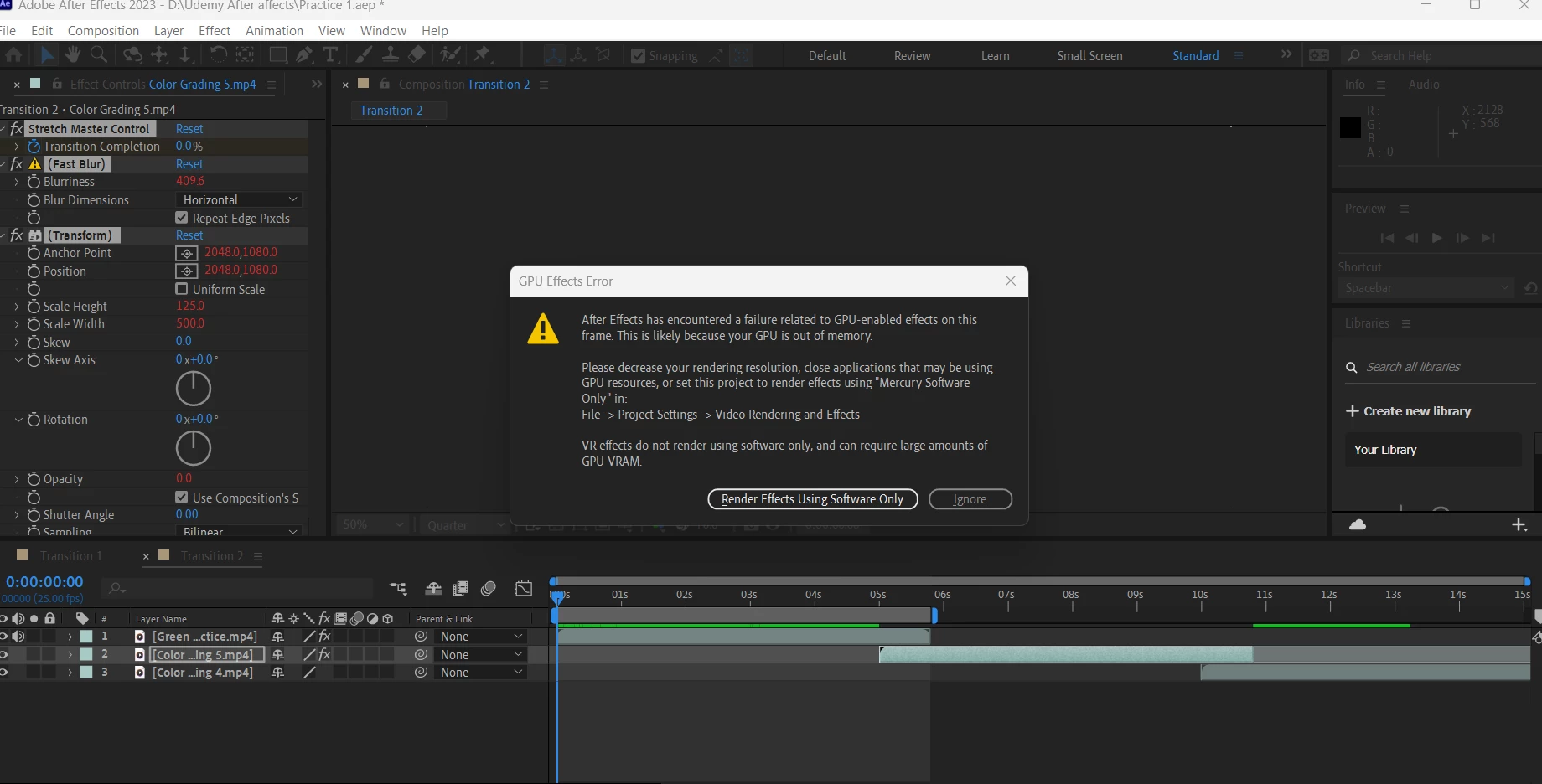
GPU Effects Error In After effects

  • January 20, 2023
  • 3 replies
  • 1212 views

Hi,

I have been using after effects for quite some time!

And now I am facing this issue
Is there any way around it!

I don't what's the issue!

My Laptop specifications:

Ram 24 Gb
512 SSD
Graphic Card: 4 GB 1660Ti
 

This topic has been closed for replies.

3 replies

Warren Heaton
Community Expert
Community Expert
January 24, 2023

Are none of the options listed in the dialog box working?

  • Close applications that may be using GPU resources
  • Set this project to render effects using "Mercury Software Only


Also, have you tried working with a mezzanine CODEC like ProRes instead of whatever your MP4 files are encoded with?


Mylenium
Legend
January 20, 2023

Check your graphics driver and update/ downgrade it. There have been a ton of issues with this lately and neither Adobe nor Nvidia seem capable of really getting a handle on it. It works in one version and then breaks again with the next update.


Mylenium 

nubnubbud
Inspiring
January 20, 2023

If you are not using a VR effect... just turn off GPU usage altogether. It's an unstable hack they used to be able to advertise capabilities the program doesn't truly support. Trust me on this- maybe a handful of effects use it, it tanks After Effects' reliability, injects bugs left and right, every other video won't render, and there will be no real cause except for "you tried using a GPU in a 30 year old program, and it bugged out for reasons mostly related to the fact that the team that hacked it in, made their unstable hack a default setting."

are you using VR effects?
If yes, it's likely the truth. these days, 4GB is not much for a GPU. As well, After effects is ATROCIOUS at being efficient with RAM. it basically throws every frame of source footage in RAM (and VRAM if using a GPU) uncompressed. depending on resolution, 4GB is enough for... maybe... 3-5 seconds of footage, max. I mean it. if you were using something like Resolve, it would just use what you do have smartly, but not After Effects. Adobe basically says "buy a $10k workstation or you're not worth developing for. Now pay us." and requirements (and bugs) get worse every year if you do pay them.

Warren Heaton
Community Expert
Community Expert
January 24, 2023

@nubnubbud 


Requirements for working with VR are clearly outline here:

Construct VR environments in After Effects


This includes the following note:
When you work with VR, you could run into memory limitations indicated by a banner that states - Requires GPU Acceleration. By default, Adobe video applications require approximately 1GB of memory for every 1K of horizontal resolution when working in VR. In After Effects 2018, you can reduce the requirements, called Aggressive Memory Management. To enable the setting, select Preferences > Previews > GPU Information > Aggressive GPU memory use (for VR).


nubnubbud
Inspiring
January 25, 2023

The issue is that the limitation is artificial. I have taken several commissions to make 3D art. the conversion from 2D to stereoscopic 3D is a nearby per-pixel edit- a simple displacement where one pixel is read, and replaced with the contents of up to a number of surrounding pixels, even in photoshop and therefore can be parallelized seamlessly to GPU's of any (or theoretically no, with terrible efficiency) memory size.

Adobe must be using a terrible library. Why not always use aggressive memory management, if it's so good? Why is after effects the only program that has to manage GPU memory aggressively, likely at massive detriment to its users? GPU's have processing units SPECIFICALLY TO MANAGE MEMORY EFFECTIVELY.
I don't care that 1k in VR -what does that even mean, that doesn't even make sense. is it 2k because stereoscopic has two fields? is it 1080? 1024? 2160? 2048? on that note, that's only horizontal resolution- vertical resolution comes in a number od standards. it's useless information because it provides a vague rule of thumb for a heavily specific professional graphics environment. 

or I guess not, seeing as adobe software hasn't been professionally usable since 2014.

I'm tired of adobe toying with people and saying "get better computers to make your experience marginally better, or we'll use features that make your experience dramatically worse, because we can't manage to get our tens of thousands of employees to develop a single new software."