Correct answer Szalam

Dude I tried updating no use.


Try installing a different version of AE (like version 16 - often called CC 2019) and see if it works.

6 replies

prupp89
Participant
July 25, 2022

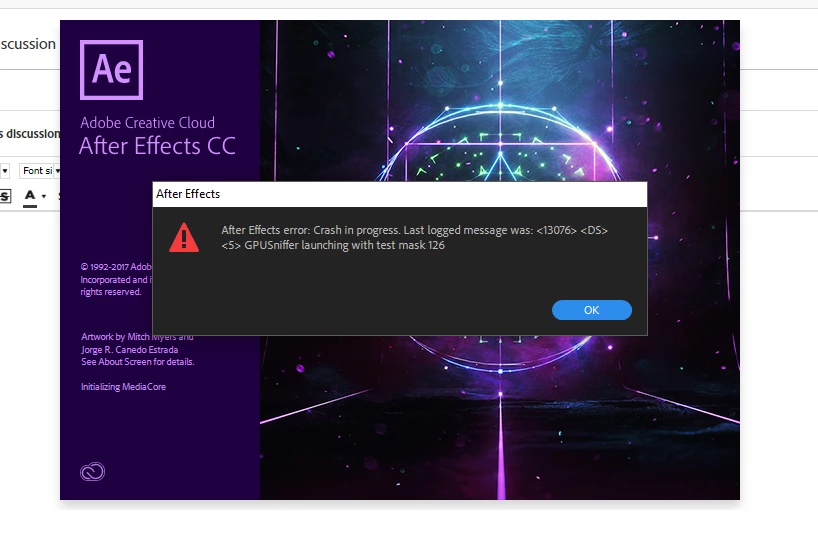
I had this issue on my work computer this morning... I had just installed a font and suddenly it came up with this error. I restarted my workstation and it happened again. Once I uninstalled the two fonts I installed this morning, it suddenly worked again. Hope this helps someone!

iamtheanimist
Participant
August 28, 2025

Its insane that this worked 

Participant
October 31, 2020

tbh m tired from this adobe support community its COMPLETELY useless with stupid solutions like update you graphic cards reinstall windows try another version LIKE I WANT TO use ae 2018 WHY THE SOLUTION IS UPDATE TO 2019 WHY ... THIS NEVER BEEN A SOLUTION THERE IS NO ACTUAL FIX FOR ANY PROBLEM HERE IF UR LUCKY ENOUGH TO FIND YOUTUBE VIDEOS OR BOOM UR LOST RIP UR MONEY FROM THIS EXPENSIVE SHET PROGRAM, ah and if ur wondering why i am angry ITS BECAUSE SINCE DAY 1 I ALWAYS FACE PROBLEMS WITH AE AND NONE OF ANY VERSION WORKS TO ME .


Participating Frequently
March 8, 2019

Thanks dude you are the best :-)

Szalam
Community Expert
Community Expert
March 8, 2019

Happy to help.

Participant
February 4, 2019

Same problem here with same message. Updated drivers incl. CUDA.  I ran gpusniffer.exe and got following:

     C:\Program Files\Adobe\Adobe After Effects CC 2018\Support Files>GPUSniffer.exe

     GPUSniffer testing 126

     Caught structured exception!Full Test test failed, trying No Metal--- OpenGL Info ---

     Vendor: NVIDIA Corporation

     Renderer: GeForce GTX 1080/PCIe/SSE2

     OpenGL Version: 2.1.2 NVIDIA 417.71 25.21.14.1771

     GLSL Version: 1.20 NVIDIA via Cg compiler

     Monitors: 1

     Monitor 0 properties -

        Size: (0, 0, 2560, 1080)

        Max texture size: 32768

        Supports non-power of two: 1

        Shaders 444: 0

        Shaders 422: 0

        Shaders 420: 0

     --- GPU Computation Info ---

     Metal test failed

     Found 1 devices supporting GPU computation.

     CUDA Device 0 -

        Name: GeForce GTX 1080

        Vendor: NVIDIA

        Capability: 6.1

        Driver: 10

        Total Video Memory: 8192MB

        * Not chosen because of initialization failure.

-Why my shaders are 0 and why it does it with metal test and not with OpenGL?

CPU: Intel i7-7700K 4.20GHz

Ram: 16,0Gt DDR4 (g.skill f4 3000C14-8gtz)

OS: Win 10 Pro 64bit

GPU: NVIDIA GeForce GTX 1080 (Hall of Fame)

MoBo: ASUSTeK COMPUTER INC. Maximus IX Hero

Participating Frequently
March 8, 2019

found any help yet?

OussK
Community Expert
Community Expert
January 26, 2019

Try to upgrade you Graphic card driver.

Participating Frequently
January 27, 2019

I did upgrade my gpu drivers still I am having this problem.

Mylenium
Legend
January 26, 2019

Nobody can tell you anything without proper system and version info.

Mylenium

Participating Frequently
January 31, 2019

PC SPECS

Operating System
Windows 10 Pro 64-bit

CPU

Intel Core i3 6100 @ 3.70GHz 35 °C

Skylake 14nm Technology

RAM

8.00GB Single-Channel Unknown @ 1063MHz (15-15-15-36)

Motherboard

BIOSTAR Group H110MH PRO D4 (U3E1) 36 °C

Graphics

W1943 (1360x768@60Hz)

2047MB NVIDIA GeForce GTX 750 Ti (EVGA) 40 °C

Storage

931GB Seagate ST1000DM010-2EP102 (SATA ) 31 °C

111GB KINGSTON SUV400S37120G (SATA-2 (SSD)) 32 °C

Optical Drives

No optical disk drives detected

Audio

NVIDIA High Definition Audio

ADOBE AFTER EFFECTS CC 2018 v15.0.0

Szalam
Community Expert
Community Expert
March 8, 2019

You should consider updating AE. I'm not talking going to some major new version (although, there have been some great new features like Master Properties that can save a ton of time depending on what kinds of projects you're doing), I'm talking just bug fix point updates. Any version number that's just 0s after the main version means it's the first release of a major version. There have been bug fix updates - sometimes critical ones!