Participant
March 28, 2017
Answered

Graph editor always showing deselected layer keys

  • March 28, 2017
  • 1 reply
  • 2386 views

Hi there,

So I'm having some issues with the graph editor. It's acting as though I've pinned a layer and its graph is always visible regardless of what else is selected. Other stuff displays too, but always this one graph.

I've been looking into if there's an option to pin attributes in the graph editor but haven't found anything useful. It is entirely likely that I just hit a combination of keys accidentally, but I have no idea what they were or could be.

Any help would be appreciated.
This topic has been closed for replies.
Correct answer Roei Tzoref

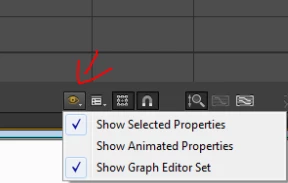
check what you got on for show properties:

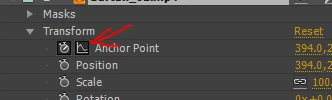
I've been looking into if there's an option to pin attributes in the graph editor but haven't found anything useful.

you are probably referring to the include property in graph editor set feature

more information here: Animation basics in Adobe After Effects

1 reply

Roei Tzoref
Roei TzorefCorrect answer
Legend
March 28, 2017

check what you got on for show properties:

I've been looking into if there's an option to pin attributes in the graph editor but haven't found anything useful.

you are probably referring to the include property in graph editor set feature

more information here: Animation basics in Adobe After Effects

Participant
March 28, 2017

YES! Thank you so much! Much appreciated It was the latter, must have clicked it by accident along the way.