adams18372647
Participant
April 3, 2018
Question

Gray/blank window after starting new project or reopening the old one

  • April 3, 2018
  • 2 replies
  • 842 views

Hello,

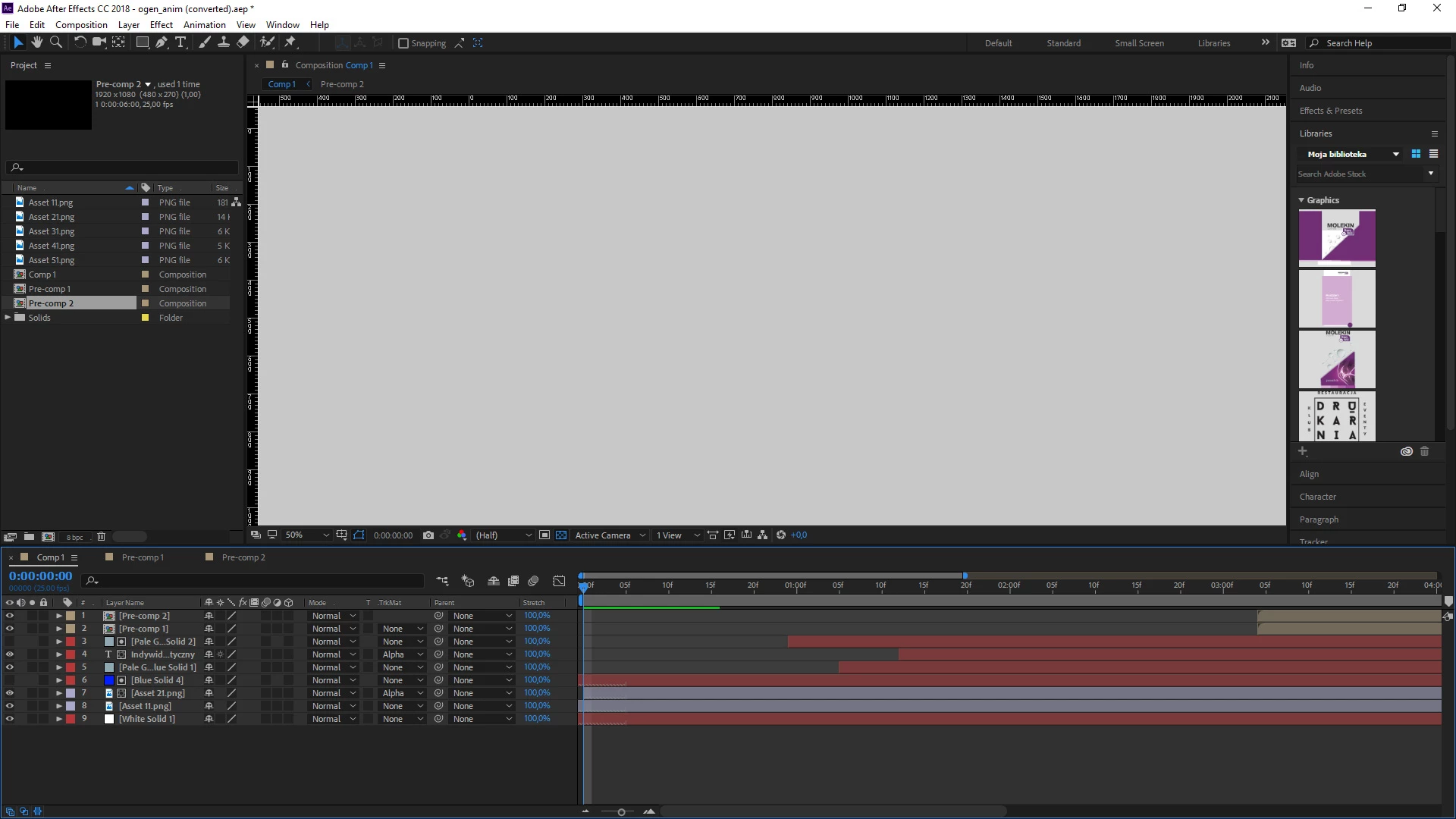
I have a problem with AE cc installed on my new computer (windows 10). I cannot display/preview anything because comp window is grayed out.

Is there any solution to make it work? pic below. Please help!

This topic has been closed for replies.

2 replies

adams18372647
Participant
April 4, 2018

it refers also to the newly created file. the file from printscreen was created with cc2017.

Kevin J. Monahan Jr.
Legend
May 11, 2018

Still having this issue AdamS? Let us know.

Thanks,
Kevin

Kevin Monahan - Sr. Community and Engagement Strategist – Adobe Pro Video and Audio
Known Participant
April 3, 2018

It could be cause by a lot of things..anyway, try to check the projects settings preferences, go to Edit, Preferences, Preview...

or disable the blue checker near "active camera" just below the display preview  

adams18372647
Participant
April 3, 2018

doesn't work. Even while i'm zooming in and out the artboard box doesn't appear. It's all gray. When hitting preview nothing happens.

Known Participant
April 3, 2018

What is the last thing did you do?