
Participant
July 27, 2020
Answered

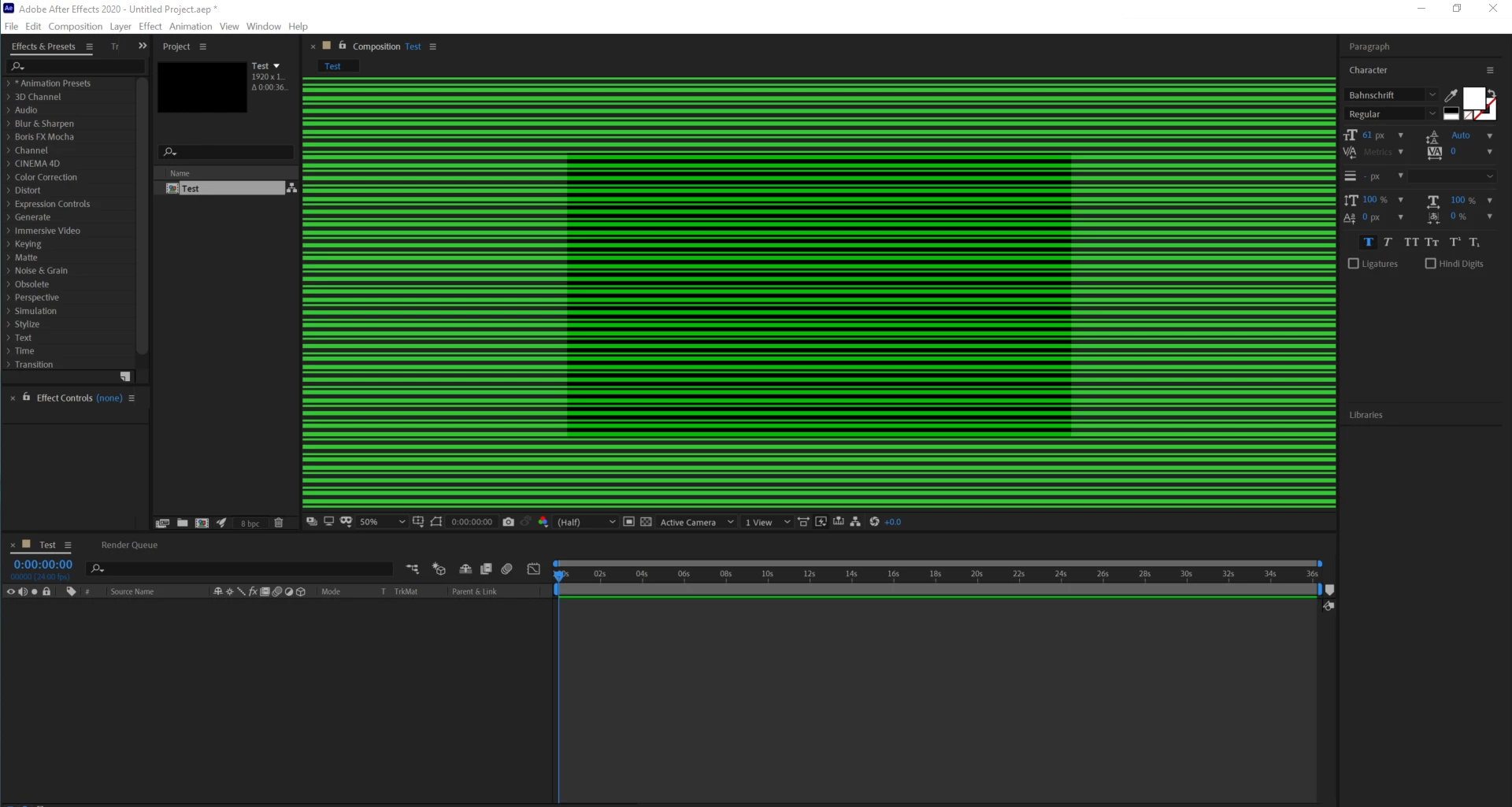
Green Lines across the AE Preview Screen?

  • July 27, 2020
  • 2 replies
  • 1085 views

I've recently updated After Effects and moved from an enterprise account to a personal account, when I opened After Effects the preview screen was covered with green lines. I've tried the various suggested solutions from other forum posts about the same issue but nothing has worked so far. My graphics drivers are fully updated and the program has worked fine previously.


Does anyone have any advice?
 

This topic has been closed for replies.
Correct answer nishu_kush

Hi willbrown202,


Sorry for the issue with After Effects.

The latest version of the Intel GPU driver seems to be causing this issue. Try installing a previous version or beta version of the upcoming Intel GPU driver and see if it brings any change: https://downloadcenter.intel.com/product/126789/Intel-UHD-Graphics-620

Let us know how it goes.


Thanks,

Nishu

2 replies

nishu_kush
Community Manager
nishu_kushCommunity ManagerCorrect answer
Community Manager
July 28, 2020

Hi willbrown202,


Sorry for the issue with After Effects.

The latest version of the Intel GPU driver seems to be causing this issue. Try installing a previous version or beta version of the upcoming Intel GPU driver and see if it brings any change: https://downloadcenter.intel.com/product/126789/Intel-UHD-Graphics-620

Let us know how it goes.


Thanks,

Nishu

Participant
July 28, 2020

This worked perfectly, thank you! 

Inspiring
July 27, 2020

This looks like a GPU driver issue. There have been reports of the latest Nvidia Studio drivers actually causing issues. The solution is to try the Game Ready driver or to roll back a version. What GPU do you have and what driver are you on?

Participant
July 28, 2020

Hi. I have an Intel(R) UHD Graphics 620, running a driver of the same name (Version 27.20.100.8280).