
Question
Green Values in the Composition Panel?
I have added an expression to a value in my composition panel. Instead of the expected red numbers, I'm getting green numbers that evaluate over time, and turn red once they find the expected value. However, if I RAM preview the comp, everything calculates much quicker than if I do a frame at a time. I should mention that the expression works as expected with no issues.
Does anyone know what these green values represent?
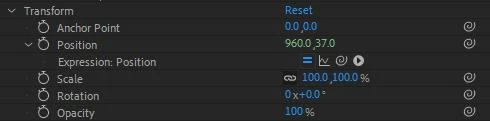
For reference, the expression in question is:
x = 960;
y = 0;
searchLayer = thisComp.layer("EKG Precomp");
lumaTolerance = 0.9;
searchRadius = [1, 1];
for (i = 10; i < thisComp.height; i++){
lumaLookup = searchLayer.sampleImage([959, i], searchRadius, false, time);
if (lumaLookup[0] < lumaTolerance){
y = i;
break;
}
}
y += (content("Ellipse 1").content("Ellipse Path 1").size[1] / 2);
[x, y]
I know that it's rough and inefficient; it was just a quick proof of concept for a coworker. It sets a layer's Y value based on the highest black pixel in a column of pixels in another layer.
 AdChoices