
Participating Frequently
July 15, 2022
Question

Having Weird MOGRT Glitches/Missing Sources?

  • July 15, 2022
  • 3 replies
  • 1029 views

Good afternoon,


I am currently using Adobe After Effects 2022 and have been trying to make some MOGRT templates for work.


However, two of my templates have had some weird source resources missing in them when in Adobe Premiere Pro (the software planned to be used to send the content to a Tricaster).


They are specifically with layers imported from Photoshop, but only with two of the renderings.


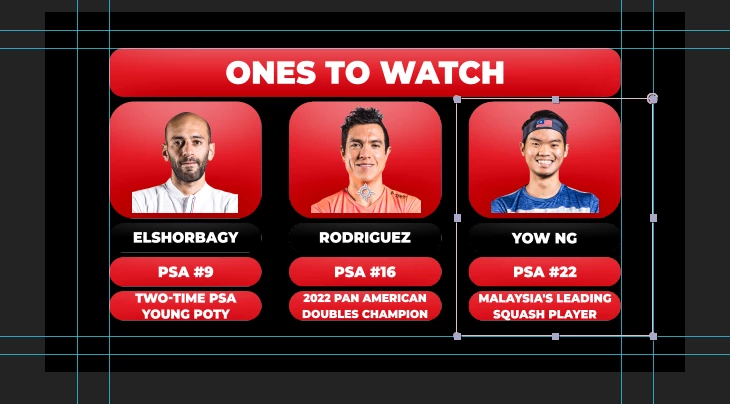
In After Effects for example, it will show up like this:
 

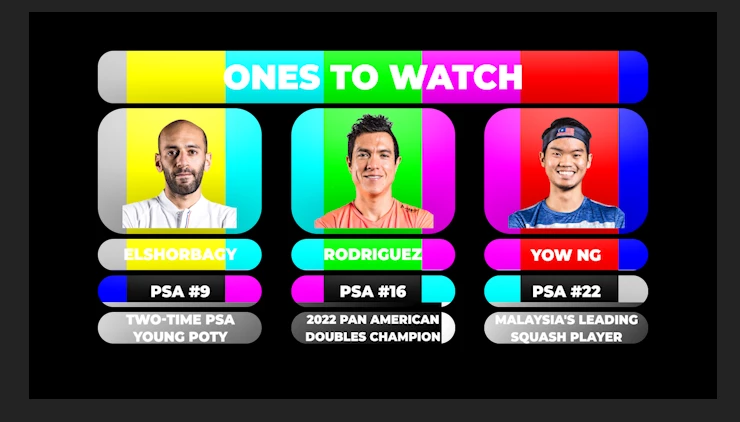
But in Premiere, they come out like this:
 

For reference, all the files are being saved to the same USB stick so I can use them on my other PC for the broadcasts.


What is causing this?

This topic has been closed for replies.

3 replies

Participating Frequently
July 18, 2022

To add to this, I have a new variant of this issue; some layers working and others failing to sync for the Essential Graphics:


The colour boxes that did show up are from a Photoshop layer. However, the road logo, which also came from the Photoshop file, did not work. The outlines for some boxes imported properly, but others did not.


It is getting pretty confusing because some other Photoshop files, some with even more listings (including full colour swaps) worked seamlessly between After Effects and Premiere Pro, but not this (which includes just three text boxes).

Participating Frequently
July 18, 2022

I should clarify the road boxes and road logo are in the same composition.

Mylenium
Legend
July 15, 2022

Start by making sure you actualkly have the correct same versions on every system, including updates. That also applies for Photoshop, as some shared libraries not being up to the same level could be causing issues. Otherwise the usual culprits come to mind: Failing hardware acceleration, botched caches, changed file paths plus what Kyle already hinted at.


Mylenium

Participating Frequently
July 15, 2022

I will re-check to see if there is an update issue on my laptop. I did notice some of the newer effects were not there on the laptop (the newer CC effects) for Premiere.


It is doing the same thing on my main PC, as well, however.

Kyle Hamrick
Community Expert
Community Expert
July 15, 2022

For the sake of exploration, are you running into this same issue when you keep them on the same machine? When exporting to a CC Library? I'd try some of those variables and see if it makes any difference.


Does the Photoshop file have nested Smart Objects, or anything along those lines? If so, and if the above doesn't work, it might be worth exploring if rasterizing those layers makes a difference.


Clearly something along the line is losing its link, so I think narrowing down the variables of where that could be happening would be my first step. 

Participating Frequently
July 15, 2022

Yes, the issue is popping up on the same PC and on different ones. I'm exporting to a folder I made on the USB to store the MOGRTs in one place.


The Photoshop files do not have smart objects for the areas causing problems.

Participating Frequently
July 15, 2022

Just confirmed, saving to local libraries does not help.