


Participant
Jan 27, 2017 7:02 PM UTC
Answered

Help! after effects error: MIR: OpenGL error: Could not allocate texFBO (512) ( 25 :: 241 )

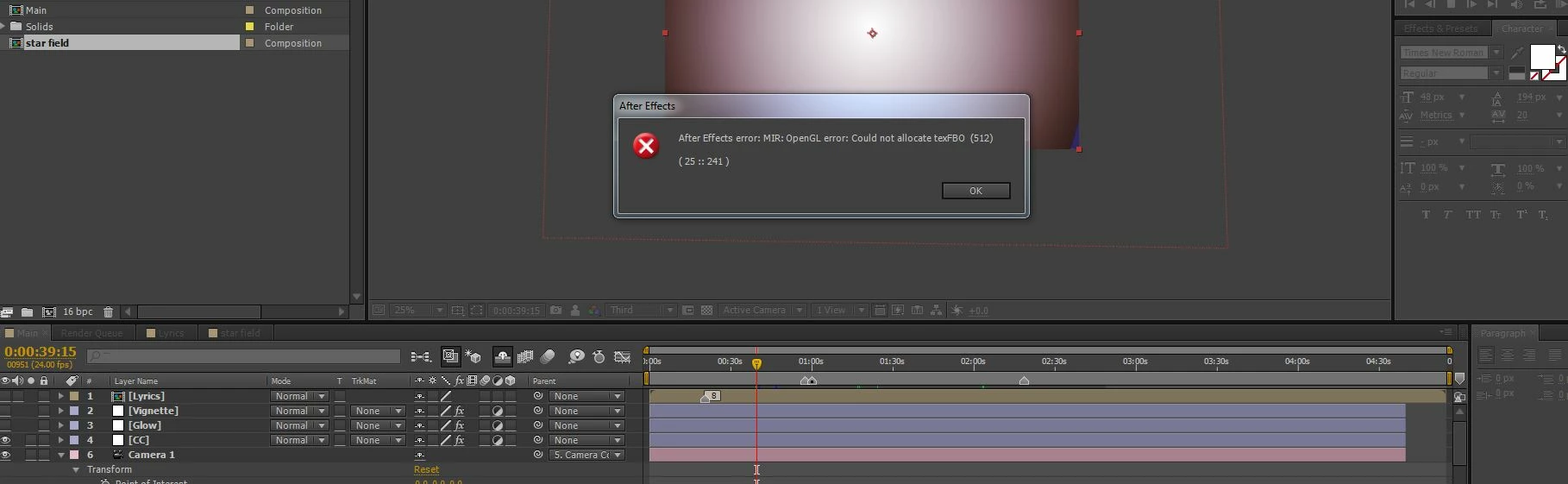
I seem to be having trouble with my Trapcode Mir plugin. I had been working on a Mir project a couple weeks ago, took some time off, and now anytime I move the cursor, I get this error:

after effects error: MIR: OpenGL error: Could not allocate texFBO (512) ( 25 :: 241 ).

The Mir form also visually looks different. The 'mountains' I had created now look like some empty geometric vector shapes.

I tried reinstalling the mir plugin, though I'm not sure how to uninstall it first. I'm relatively new to AE, so it's very possible I'm missing something obvious. Also, I'm still using CS6, Version 11.0.0.378 and I'm working in Windows 7 64bit with 32Gb of ram, 3.5Ghz X4, and an Nvidia Quadro K2200 graphics card that was having problems until I reseated it a few days ago.

I'm not sure what else to try. I've attached a picture of the error message.

Thanks for any help!
This topic is closed to new replies. Start a new post to keep the conversation going.
tnabes1Correct answer
Participant
Feb 16, 2017 8:32 PM UTC

Thanks for the help. Red Giant support was able to resolve my issue. I'll share the solution for the benefit of others:

I had a third monitor that was plugged into the motherboard, using it's cheap onboard graphics adapter, and I had made that into my desktop's primary monitor. Simply switching the desktop's primary monitor to one of the monitors on my Nvidia Quadro K2200 card solved the problem.

8 replies

tnabes1AuthorCorrect answer
Participant
Feb 16, 2017 8:32 PM UTC

Thanks for the help. Red Giant support was able to resolve my issue. I'll share the solution for the benefit of others:

I had a third monitor that was plugged into the motherboard, using it's cheap onboard graphics adapter, and I had made that into my desktop's primary monitor. Simply switching the desktop's primary monitor to one of the monitors on my Nvidia Quadro K2200 card solved the problem.

Translate
Participant
Aug 24, 2022 8:39 AM UTC

hey, im having the same error but i only have a LG monitor and my graphics card is a RX 580 Series with a i7 8700

Translate
Participant
Oct 31, 2022 4:11 PM UTC

If you update graphics card RX 580 Series, try backup it to the previous version driver (try older version like this https://download.gigabyte.com/FileList/Driver/Radeon-Software-Crimson-ReLive-17.8.1-Win10-64Bit-Aug18.exe?v=4ed478332c1a1fb0410a22761d8bddd2 ).


Translate
Kevin J. Monahan Jr.
Legend
Feb 6, 2017 11:37 PM UTC

Hey tnabes1,

Ever solve this issue? What did you end up doing? Thanks for letting us know!

Regards,
Kevin

Translate
Kevin Monahan - Sr. Community and Engagement Strategist – Adobe Pro Video and Audio
tnabes1Author
Participant
Feb 13, 2017 7:23 PM UTC

No I haven't had any luck with this. I upgraded to the CC 2017 and re-installed the trapcode plugins. I still have this issue. The Mir objects don't seem to be rasterizing correctly and I still get the same error message every time I try to play the timeline. Even starting a new project with only one Mir object on the timeline brings about the same issue. Could it be my graphics card failing? So far I haven't experienced this issue with any other Trapcode plugin, though I haven't tried them all.

Here is a video of the issue:

Translate
Kevin J. Monahan Jr.
Legend
Feb 15, 2017 1:25 AM UTC

Hey there tnabes,

At this point, give RedGiant a shout: Get Support | Red Giant I think they may be able to assist. If not, please let us know and I'll escalate the issue.

Thanks,

Kevin

Translate
Kevin Monahan - Sr. Community and Engagement Strategist – Adobe Pro Video and Audio
Szalam
Community Expert
Community Expert
Jan 30, 2017 7:06 PM UTC

First things first, you should update AE. CS6 should be on version 11.0.4.

Translate