
Participating Frequently
August 18, 2017
Answered

Help! Creating a Shadow Catcher creates a black square.

  • August 18, 2017
  • 3 replies
  • 3174 views

I have restored the settings and I am still having issues. Im new to After effects, im reading a book following tutorials and ran into an issue its not acknowledging.

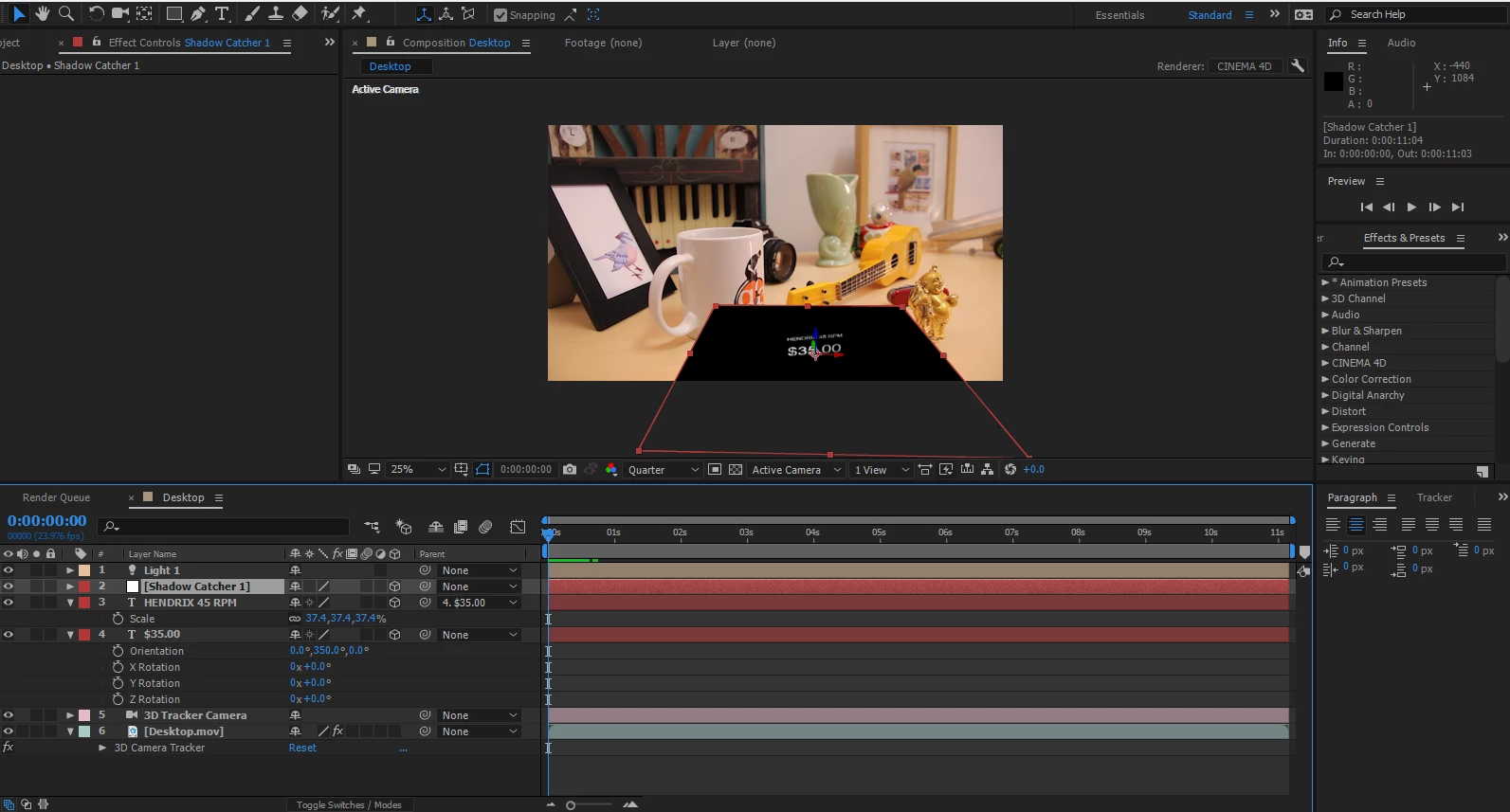
I am told to Create a Shadow Catcher and Light under an area of text thats on top of a video later thats been tracked.   When I create the Shadow Catcher and Light , the Shadow Catcher appears as a Black square.  I believe its suppose to be transparent? or just doing something else. How do I fix this??

Thanks

-blades
    This topic has been closed for replies.
    Correct answer Roei Tzoref

    change your renderer to classic 3d or ray-trace 3d (only if you are planning to use extrusion and you have the proper GPU for it). the cinema 4d renderer does not support shadow only"

    3 replies

    Participant
    June 20, 2022

    Lol, I'm using the exact same tutorial and had the same issue. Turns out it's because the cinema 4d rendere is still active by the same book's very previous tutorial.


    RemusBlueFX
    Participating Frequently
    August 24, 2017

    You can just use the Classic 3D renderer, the only caviat is that the text comes off black at first because the light is positioned very far away by default. The best solution is to just copy the position of the text and paste it onto the position of the light, and then move the light on top of the text. Also, if you increase the diffuseness on the light, it make the shadow look really cool

    https://bluefx.net/3d-tracking-with-shadow-catcher

    Roei Tzoref
    Roei TzorefCorrect answer
    Legend
    August 19, 2017

    change your renderer to classic 3d or ray-trace 3d (only if you are planning to use extrusion and you have the proper GPU for it). the cinema 4d renderer does not support shadow only"

    Participating Frequently
    August 19, 2017

    Thank you Roei!