
Participant
August 22, 2021
Answered

HELP!!! - Expression Error - no add() expression, BUT add() needs exactly two arguments

  • August 22, 2021
  • 1 reply
  • 881 views

Dear Swarm,

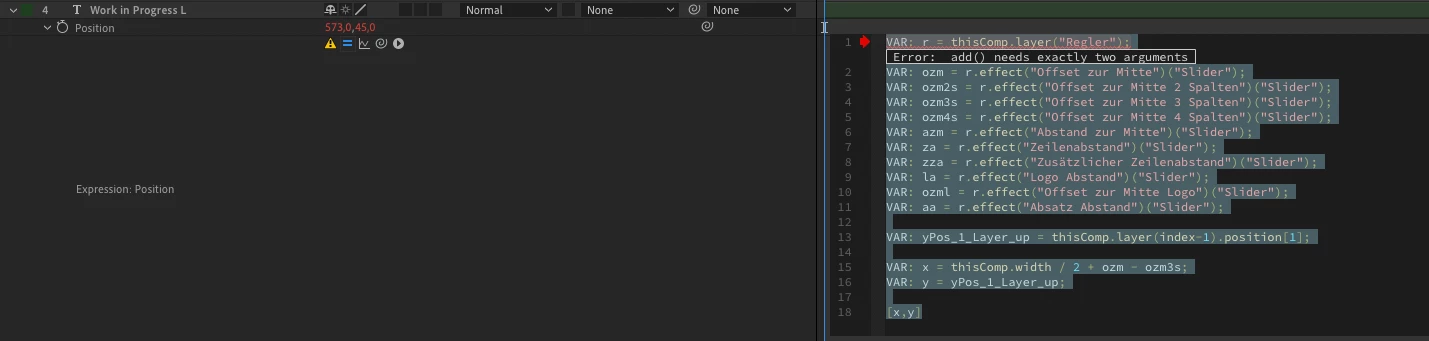
I am in urgent need of help. All of a sudden I get the following error message referring to line 1 in layers of a project wich was working absolutely fine before.

"Error: add() needs exactly two arguments"

Can anyone tell me what I can do to change the syntax so that the expression is working again? The Expression influences the position value of several layers and is actually quite simple. Please take a look:


VAR: r = thisComp.layer("Regler");
VAR: ozm = r.effect("Offset zur Mitte")("Slider");
VAR: ozm2s = r.effect("Offset zur Mitte 2 Spalten")("Slider");
VAR: ozm3s = r.effect("Offset zur Mitte 3 Spalten")("Slider");
VAR: ozm4s = r.effect("Offset zur Mitte 4 Spalten")("Slider");
VAR: azm = r.effect("Abstand zur Mitte")("Slider");
VAR: za = r.effect("Zeilenabstand")("Slider");
VAR: zza = r.effect("Zusätzlicher Zeilenabstand")("Slider");
VAR: la = r.effect("Logo Abstand")("Slider");
VAR: ozml = r.effect("Offset zur Mitte Logo")("Slider");
VAR: aa = r.effect("Absatz Abstand")("Slider");

VAR: yPos_1_Layer_up = thisComp.layer(index-1).position[1];

VAR: x = thisComp.width / 2 + ozm - ozm3s;
VAR: y = yPos_1_Layer_up;

[x,y]
This topic is closed to new replies. Start a new post to keep the conversation going.
Correct answer Rick Gerard

There is a lot of unused junk in your expression. All of the VAR: statements are not necessary. Let me break it down.


You have a layer names "Regler" that has 10 Effect Control Sliders on it. 

You are defining the Y value from the layer above. 

You are modifying the X value by adding the value of the "ozm" slider, then subtracting the value "ozm3s" slider from the comp center. 


That entire mess can be reduced to this:

r = thisComp.layer("Regler");
ozm = r.effect("Offset zur Mitte")("Slider");
ozm3s = r.effect("Offset zur Mitte 3 Spalten")("Slider");

y = thisComp.layer(index-1).position[1];
x = thisComp.width / 2 + ozm - ozm3s;
[x,y]

If the layer name with the sliders is correct and the names of the sliders are correct then the expression should work. It's never a good idea to have unused variables in your expressions. Adding one slider value then subtracting another is also redundant unless those two sliders are doing different things to different layers. 

1 reply

Rick GerardCommunity ExpertCorrect answer
Community Expert
August 22, 2021

There is a lot of unused junk in your expression. All of the VAR: statements are not necessary. Let me break it down.


You have a layer names "Regler" that has 10 Effect Control Sliders on it. 

You are defining the Y value from the layer above. 

You are modifying the X value by adding the value of the "ozm" slider, then subtracting the value "ozm3s" slider from the comp center. 


That entire mess can be reduced to this:

r = thisComp.layer("Regler");
ozm = r.effect("Offset zur Mitte")("Slider");
ozm3s = r.effect("Offset zur Mitte 3 Spalten")("Slider");

y = thisComp.layer(index-1).position[1];
x = thisComp.width / 2 + ozm - ozm3s;
[x,y]

If the layer name with the sliders is correct and the names of the sliders are correct then the expression should work. It's never a good idea to have unused variables in your expressions. Adding one slider value then subtracting another is also redundant unless those two sliders are doing different things to different layers.