Participant
September 20, 2021
Question

Help fix pixels blur 3d element

  • September 20, 2021
  • 2 replies
  • 247 views
Ask a question about After Effects Element 3D
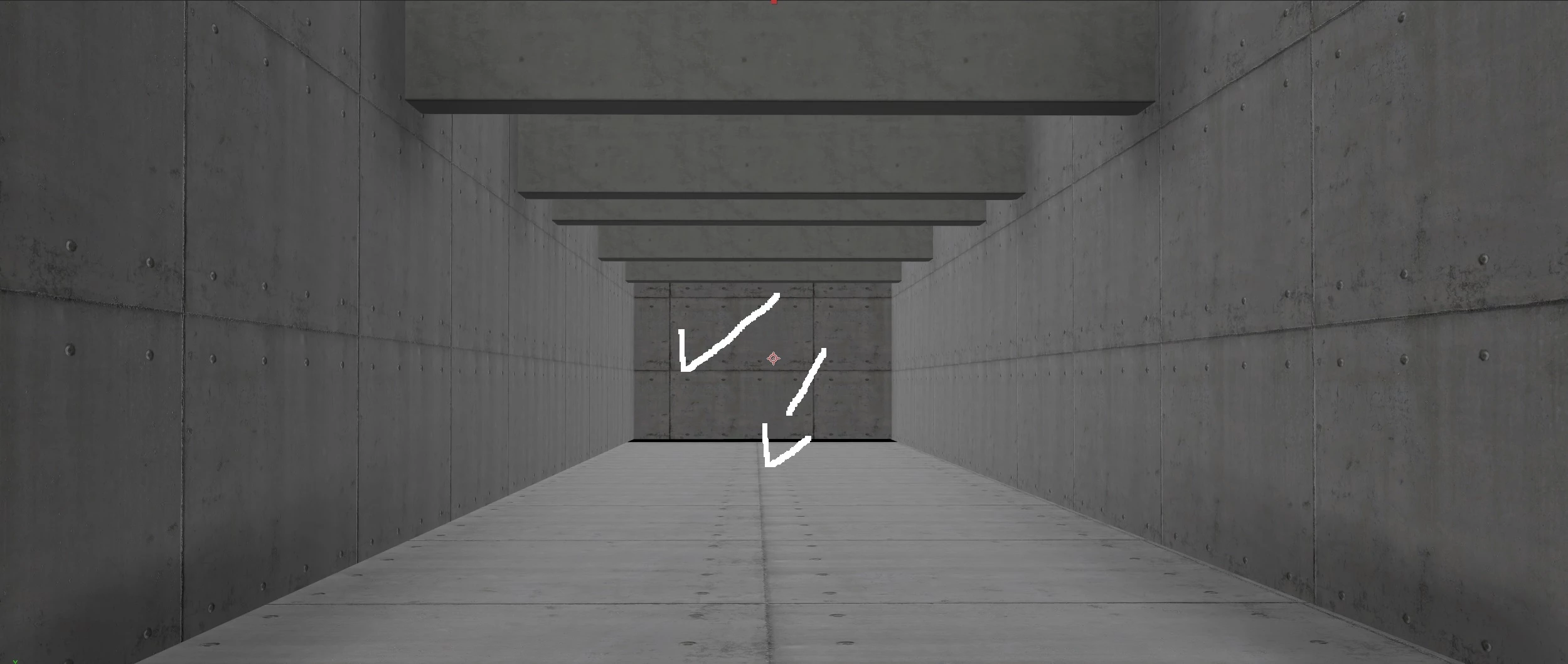
When I make a scene on Element 3D, why does background distortion appear on the ground? I want to understand what I should do. There is fog on the ground, how do I fix it?
    This topic has been closed for replies.

    2 replies

    Mylenium
    Legend
    September 20, 2021

    Nothing wrong. You seem to underestimate the effects texture filtering and antialaising can have and your textures are simply rather low-res. Even the foreground shows softness and upsampling. To improve crispness you will have to create larger textures. Improvements to your textures would be advisable, anyway. The repetitions are painfully obvious. Of course that is still limited by what a realtime rendering plug-in like E3D, so this may end up being more complex and you may need to re-edit the actual 3D model to assign individual materials or create extra regions that can be mapped separately.


    Mylenium

    Participant
    September 20, 2021

    I have attached pictures to you that show you, but I want to understand why the distortion appears only on the floor. Is there an option in After Effects that increases the intensity of the floor? I don't know. I want a solution, please


    Community Expert
    September 20, 2021

    There are about a hundred different basic workflows with Element 3D but we know absolutely nothing about yours so I have no idea how to fix what you have done or even how you did it. 


    I suggest you post some screenshots that show us the modified properties inside Element 3D and in your AE comp so we have some idea how you are applying the textures and setting up the scene.


    Another option would be to go to Video Copilot and go through several of their Element 3D tutorials. Most of the Element 3D tutorials I have seen that are not produced by Video Copilot leave a lot to be desired. Go to the source.