
Inspiring
January 24, 2023
Question

HELP: How to sync a plugin parameter to a layer transform's position ?

  • January 24, 2023
  • 3 replies
  • 1669 views

Hi everyone, 


I have written a plugin that checkouts a layer (PF_ADD_LAYER) and displays it on the layer the effect is applied to. I've also made it possible to control the position of the displayed layer through controls on the effect's UI (PF_ADD_POINT for the position for example, PF_ADD_ANGLE for the rotation etc).


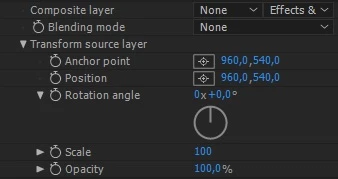
My question is: how can I automatically sync these transform parameters (position, rotation, scale...) to the selected source layer's transform data, so the checkout layer is displayed at the same position as the original layer ? Yes it is possible to do it through the traditional After Effects' expressions. But I was looking for a way to do it automatically within the plugin.
 

This topic has been closed for replies.

3 replies

Community Expert
January 25, 2023

short answer: highly unrecommended.


long answer:

well... there no "link" method (besides expressions, as you have said). you can check the values on idle time and then copy them if changed, but that won't work during rendering. it would also be problematic with undo/redo as the user may be aditing the target layer...


my suggestion is to add a drop down with 2 options:

1. manual controls

2. follow original layer

if 1 is seleted, show the controls. if 2 is selected hide the controls and get the values from the original layer.

Inspiring
January 27, 2023

Thanks a lot for your answer. I've managed to implement the first option, however I struggle to implement the second one:

I am able to get the selected source layer's transform data (position, rotation...) using the AEGP_SuiteHandler methods. However I am not sure how to watch for changes on this data. I tried creating another thread and check the values each second. But it doesn't work and I don't like this solution. Is there another cleaner method to do it?

Community Expert
January 28, 2023

lookup GuidMixInPtr.

it's means of telling AE during SmartPreRender calls what external data (that is not directly referenced by the effect using traditional methods) this render relies on. AE calls pre-render whenever there's a change in the comp, to let effects report if they were relying on some external data that might have changed.

if the resulting GUID differs from the one AE has associated with the cached frame, AE invalidates the cahce and re-renders.

you can factor anything you like into the GuidMixInPtr function, including the transform data of some random layer.

James Whiffin
Legend
January 25, 2023

Are you wanting your plugin's transform params to be synced to your original layers transforms? The only way is by expressions since params can't be updated on the fly through c++ plugins. 

Mylenium
Legend
January 24, 2023

You probably simply need to query the default property streams, instanciate them and weave them into your matrices. 


Mylenium