
shonib
Participating Frequently
September 3, 2017
Question

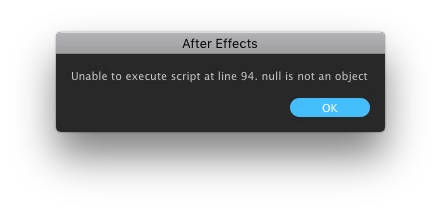
Help! Script errors "null is not an object"

  • September 3, 2017
  • 4 replies
  • 9403 views

I'm not a scripter, but I use scripts from aescripts.com

Recently, after migrating to a new machine, many of my scripts aren't working, they throw an error "Unable to execute script at line 94. null is not an object"

At least 2 scripts mention the same line number, which is odd.

The folks at aescripts said it was a permissions error on home folder, but I re-installed Ae, chowned and chmodded my home folder ... nothing works.

Any ideas?
This topic has been closed for replies.

4 replies

Artem Stepanov
Participant
June 13, 2021

Help

Participant
June 14, 2021

If you use DropBox backup, this is likely the issue.  AEScripts did a nice writeup.  Here is a link to their post:  https://aescripts.com/knowledgebase/index/view/faq/dropbox-macos-warning/

Professor Panda
Inspiring
August 19, 2021

@RhinoMI Thank you! This was exactly my issue. Disabling Dropbox back up only for my Desktop folder resolved the issues I was having with my AE Scripts not loading and throwing that "null is not on object" issue.


shonib
shonibAuthor
Participating Frequently
September 5, 2017

Anyone?? HELP!?!? This is driving me nuts. Tried reinstalling Ae, reinstalling the Scripts... nada...

Kevin-Monahan
Community Manager
Community Manager
October 2, 2017

Hi shonib,

Sorry for this issue. Did you ever find a solution? Please let us know if you have or if you still need help. You also might want to contact aescripts support to ask them for assistance.

Thanks,

Kevin

Kevin Monahan - Sr. Community & Engagement Strategist – Pro Video and Audio
Participant
August 11, 2020

Hi Kevin!
im having the same problem..
(With Motion V2 and SwissKnife) 
i reinstalled the scripts, AE and all my creative cloud suite but nothing worked...
frustrated and dont know what to do
(happens to me both on AE19 and 20)
im working on imac 2019 Mojave
any ideas?

Mylenium
Legend
September 3, 2017

And what scripts? What built-in (not user-defined) functions are called at those lines? assuming there is any pattern to this madness it probably means that some internals have changed and you may need to rewrite some stuff. It also seems that the auto-catch where AE tries to determine wehther a value or function/ method is referenced is not working relaibly in recent AE versions, so you may need to append and explicit .value() somewhere or soemthing trivial and silly like that...

Mylenium

shonib
shonibAuthor
Participating Frequently
September 3, 2017

The scripts are BG Renderer Pro and GEOLayers -- both of which are locked so I can't view the script code, so I don't think I can diagnose in any of the ways you suggest.

angie_taylor
Legend
September 3, 2017

Have you tried installing AE in the main Applications folder, in HD, rather than in the Home folder's Application folder?

shonib
shonibAuthor
Participating Frequently
September 3, 2017

I always install via Creative Cloud, in /Applications.

I never installed in my home folder.