Participating Frequently
July 19, 2017
Question

Help to remove an issue

  • July 19, 2017
  • 2 replies
  • 546 views

Hey,

So recently on after effects I been getting a weird issue. So the problem is I'm making a video and it seems that theres a weird outline thing when I like make a slide / transition.
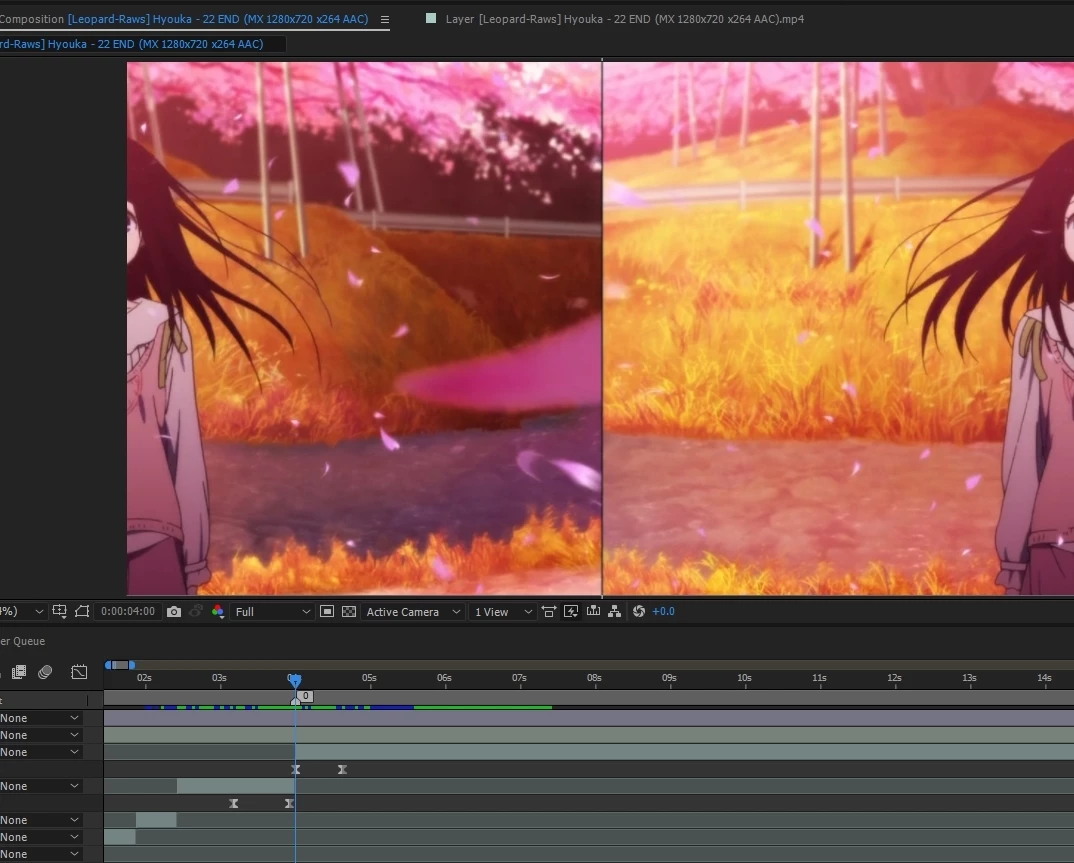
It's the weird grey line in the middle of the scene above. How do I fix this? As in to remove it or make it disappear, are there any options for this?

If you could help me out it would be amazing,

Sincerely,

Baris

    This topic has been closed for replies.

    2 replies

    P.M.B
    Legend
    July 19, 2017

    You're also working with your transparency disabled which is not a good idea.  The little checker board just the left of "active camera": click it to enable transparency.

    ~Gutterfish
    YukimeraAuthor
    Participating Frequently
    July 19, 2017

    Oh thank you for the tip

    Just a question, what is the purpose of it?

    P.M.B
    Legend
    July 19, 2017

    Well, when it's not enabled (which it isn't by default) After Effects creates a "false" background or matte.

    It's fake because it does not render.  It only exists in the preview.

    So what happens is new users will create a new project and think they're giving it a blue background when they're not.

    I suppose it has its occasional use while working but I can't see any logical benefit in having disabled by default.

    Mostly, the only thing it does is confuse new users.

    ~Gutterfish
    Community Expert
    July 19, 2017

    My first two guesses. 1: The images are not precisely lined up on the pixel grid causing the edges to antialias. 2: The images do not completely fill the frame - there are black pixels on the edge.

    Check by setting magnification (far left option in the composition panel) to 800% or higher and view the edges. Make sure view transparency grid is turned on.

    If there are black pixels crop or mask your images to remove the edges. If the edges do not line up precisely then overlap the images slightly or carefully align them.

    YukimeraAuthor
    Participating Frequently
    July 19, 2017

    Thank you a lot for the reply,

    So I guess you were right on some parts but,

    the black line is not part of the original footage/scene so maybe I have some wrong setting with the transition (what has to do with the keyframes etc),

    Or like you said that it's not lined up precisely, if so how could I fix that?

    Thank you,