
Help with Multi Frame Rendering
Yesterday I tried out the new v22.11 version of AFX to benefit from Multi Frame Rendering as I was so ready to not have to wait more than 4 hours to export a 3 minute video.
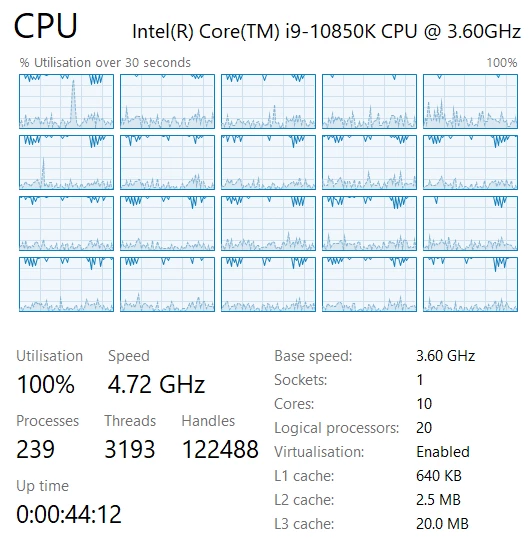
The results were immediately fantastic, with my render time going down to 45 minutes! I was amazed and incredibly relieved - I could now get the most out of my CPU and get a TON more done, This is what my CPU looked like at the time:
Today, I go back to my project (still open and running from yesterday) and amended a single text layer (and literally nothing else) before re-exporting with the same settings (duplicated the render queue entry). To be clear, the text is the only thing I changed. It's now gone back to taking over 4 hours to render out, and despite MFR being enabled and the progress details telling me it's rendering 7 (sometimes 16) concurrent frames, this is what my CPU looks like today:
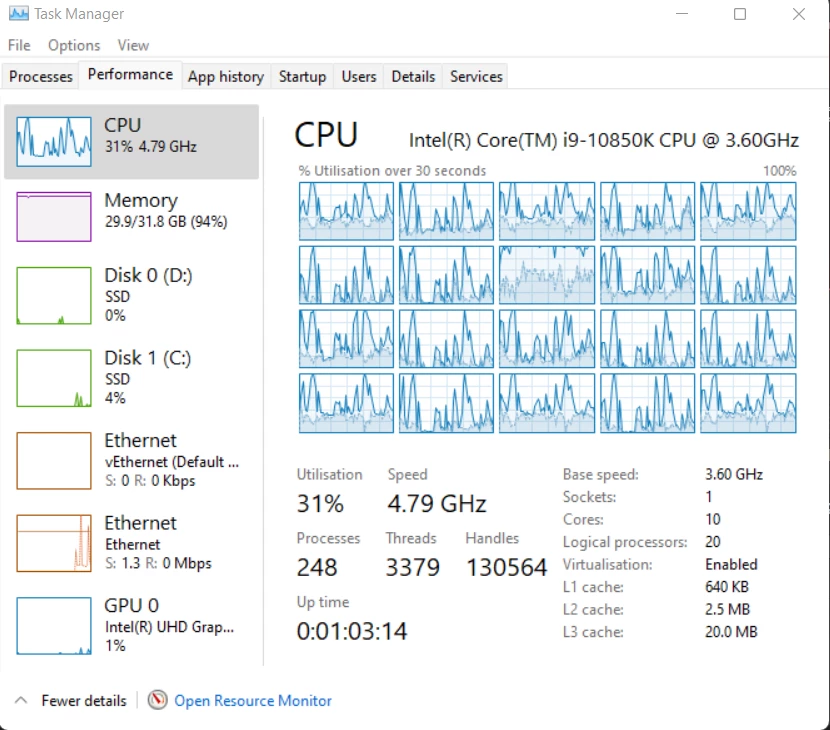
It looks like it's only fully utilising one core again? And the overall usage barely goes over 35%. How can I get it to slam my CPU again? That was brilliant!
I've tried restarting, enabling GPU acceleration, clearing cache among some other things I can't remember rn and I just can't get it to slam my CPU in the same way it did yesterday.
Anyone else got any ideas?
You can see my specs in the screenshots, export settings are default 'best' quality and Quicktime ProRes 442, plenty of memory on the SSD I'm writing to.
Thanks in advance.
 AdChoices