

Matt_92119
Participant
February 13, 2026
Question

Help With Obj Material Assignment

  • February 13, 2026
  • 2 replies
  • 0 views

Hello all, thanks for taking the time to read my question. 
I am using AE 26.2 with my composition rendered set to Advanced 3D.

I have imported an obj file but can not assign a jpg material to it. Or any image file for that matter.

Under the objects material options both “default” and “Material 2” only have “Default” as an option in the dropdown.

Same with using either the GLB or GLTF format of the 3d asset.

Any help with I might be doing wrong would be much appreciated.
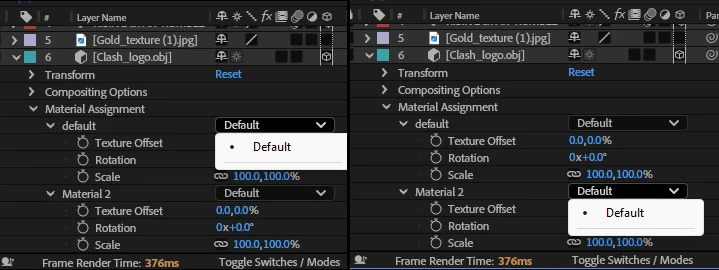
No texture options available other than default


    2 replies

    nishu_kush
    Community Manager
    Community Manager
    February 16, 2026

    I agree with what the expert suggested. Here’s a tutorial that should help: 

    Feel free to reach out if there are any other questions.


    Thanks,

    Nishu

    Matt_92119
    Participant
    February 16, 2026

    That clip helped a lot, thank you.

    ShiveringCactus
    Community Expert
    Community Expert
    February 16, 2026

    I think you can only assign Substance materials, not any image.  But fortunately there’s a whole lot of free substance materials you can download.

    Just make sure they are SBSAR files:

    https://substance3d.adobe.com/assets/allassets?assetType=SubstanceMaterial&free=true

    Matt_92119
    Participant
    February 16, 2026

    That did the trick!
    Thanks so much for the help.