Inspiring
September 25, 2018
Question

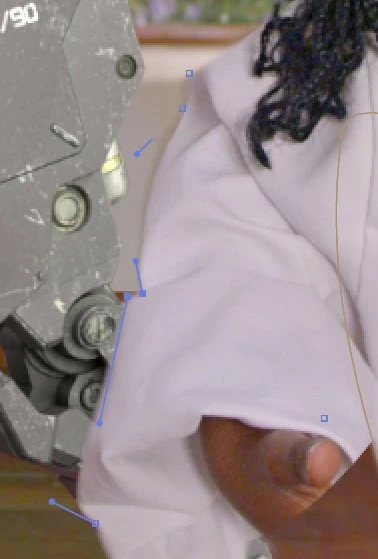
Hiding Mask Lines but keeping vertices.
  • September 25, 2018
  • 2 replies
  • 1887 views

How cool is this!?  This happened by accident in a shot I was masking out.  And then it stayed like this for another 20 minutes, and it was REALLY great to mask out without having the lines in the way all the time.  But it was a one time thing, I've not been able to replicate it.  Is this an actual thing that I can do or did I just hit a graphics glitch?

I was on Ae 15.1.2 on Windows 10.

This topic has been closed for replies.

2 replies

OussK
Community Expert
Community Expert
September 25, 2018

Really it look like it's a shape layer for me and not a mask, because by default if you don't close a mask path and you start a new mask it will come in different color, but in your case all mask are blue witch i think it's shape layer. so are you able to start this over and be sure to draw a single closed path

Inspiring
September 25, 2018

I'll say again, there is nothing wrong with the mask.  It is a full, complete, and closed mask that is working.  It is not a shape layer.  The lines of the mask are just hidden.

OussK
Community Expert
Community Expert
September 25, 2018

So if you can't see the mask try to hit this button

Mylenium
Legend
September 25, 2018

Actually it's more likely that you created two points so close together that they cannot be discerned visually. This happens if e.g. your tablet/ mouse click rate is too sensitive.

Mylenium

Inspiring
September 25, 2018

Thanks, @mylenium.  I don't see how that's possible.  If I double click on a point while drawing a mask it just selects that last point.  That whole lot is a single mask.  I was still able to manipulate the mask and animate it for a while, and it worked properly but the lines were just invisible.

While manipulating it and animating it I didn't find any double points.

I'll try what you're suggesting though just to make sure, but I'm not convinced.

EDIT:

Nope, gave it a bash.  Double clicking only selects what's already there.  I've also tried moving points of an already created mask very close together but the line doesn't disappear.