
Participant
May 30, 2018
Question

How can I export an after effects mp4 to fit an android screen

  • May 30, 2018
  • 4 replies
  • 6308 views

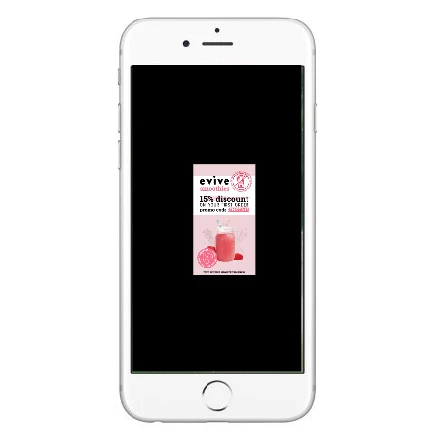
Hi. So my problem is that I've created a 1080 x 1920 after effects file and when I export it as mp4 and open it on my smartphone, it's a tiny video surrounded by black
(as shown in example below) Can someone tell me what I'm doing wrong? I'm new with this program but I've tried a couple of things (resizing, changing the resolution, changing the exportation presets) and nothing has worked. It's going to be used as an instagram story if that info could help. Thank you.
This topic has been closed for replies.

4 replies

ShiveringCactus
Community Expert
Community Expert
September 11, 2021

What happens if you upload this video (unlisted) to youtube?  Does it appear as your screenshot above or is it correctly filling the screen?  If you look at the file properties of the video oin your cumpouter, what are the dimensions?


For some reason, your phone thinks this is a horizontal video and not a vertical one.  I think the issue might be in Adobe Media Encoder's preset.  In AME, once you've selected the preset, click on the blue link it becomes.  In the video tab, I think you might find the video is 1920 wide.  You can alter the preset's dimensions in the same screen.


https://youtu.be/W-usRdlcOHQ?t=114


Participant
May 30, 2018

Ok so below is how I created my document in Adobe Iillustrator (1080 x 1920 RGB)

Then I saved the file as I usually do (see below)

I then dragged and dropped it in After Effects and when I'm done, I export - add to media encoder queue

Then when I'm in Media Encoder, I choose the HD Mobile Device 1080 option and click play.

I'm probably doing a couple of things wrong since I'm a newb in the video world. But shouldn't it fit a mobile screen?

Thanks

Dave_LaRonde
Inspiring
May 30, 2018

What happens if you rotate the phone on which you see this by 90 degrees?

Participant
May 30, 2018

It just gets a little bigger but there's still black on both sides

Roland Kahlenberg
Legend
May 30, 2018

I'm in agreement with Mylenium - at this stage, only God knows what you've done. We'll need to look at details of your Render and Output, in the Render Queue. We'll also need to look at your source footage details and Composition Settings. 

Very Advanced After Effects Training | Adaptive & Responsive Toolkits | Intelligent Design Assets (IDAs) | MoGraph Design System DEV
Mylenium
Legend
May 30, 2018

Impossible to say anything without knowing exact render settings and stuff. You probably simply picked an unsuitable output preset that has built-in size constraints.

Mylenium