
Inspiring
April 9, 2024
Answered

How can I move the puppet pin tools in the timeline?

  • April 9, 2024
  • 2 replies
  • 789 views

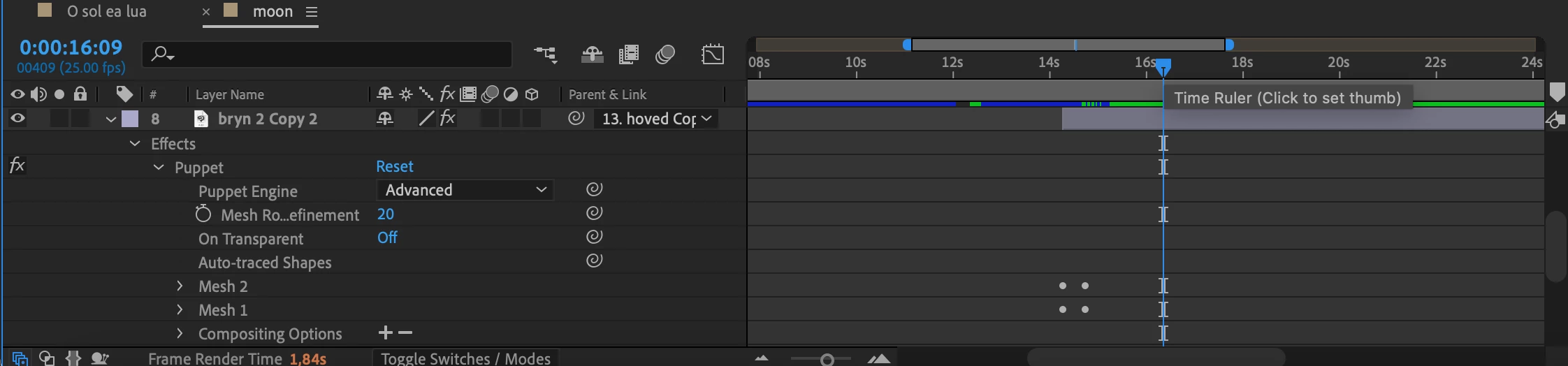
Hi. I want to move the puppet pin tools in the timeline, so that my animation is faster in that scene. I've tried to move them with the select tool, but it couldn't grab them. So how do I move them? 
This topic has been closed for replies.
Correct answer Rick Gerard

Pressing the 'u' key will reveal the actual keyframes, so you can select them and move them around. The little round dots tell you that there are keyframes under the Mesh 1 and Mesh 2 properties. They are not the actual keyframes.

2 replies

Mylenium
Legend
April 10, 2024

Selecting the keyframe indicators should work, but yes, reveal the actual keyframes by hitting U or UU and use those. Looks like another bug, but what else is new these days? 😉


Mylenium

Inspiring
April 11, 2024

Thanks! That worked 

Rick GerardCommunity ExpertCorrect answer
Community Expert
April 10, 2024

Pressing the 'u' key will reveal the actual keyframes, so you can select them and move them around. The little round dots tell you that there are keyframes under the Mesh 1 and Mesh 2 properties. They are not the actual keyframes.

Inspiring
April 11, 2024

Thank you, that worked!