
Known Participant
August 5, 2022
Answered

How do I disable all effects inside a currently selected layer using Automation Blocks?

  • August 5, 2022
  • 1 reply
  • 2105 views

Hi!


Right now I have a script that creates an adjustment layer, turns it into a guide layer, and then adds three built-in effects to that layer.


What I want to have happen is disable all three effects after creating them. The name of the comp the layer is inside will always be different, so I don't want to have to click the "refresh" button to have it populate the current effect inside the script for all three effects before I run it each time, if that makes sense?


Thank you!
This topic has been closed for replies.
Correct answer Mathias Moehl

Being that clicking the refresh button is not useful to me because the comp names will always be different, how would I disable or enable specific effects in a layer, when I won't know ahead of time what the comp name is? I realized the method I used alters ALL the effects on a layer, but there is one effect I would like to start off as disabled.


Do you mean the layer name will be the same, but the comp name not?

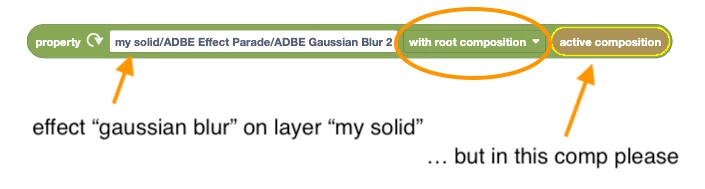
In the image above, I showed how to use the "with root layer" option, to change the layer dynamically.

You can also set this option to "with root composition" to only change the comp dynamically:

1 reply

ckuehneAuthor
Known Participant
August 5, 2022

Sorry - I just figured this out - by using the "For each effect", and inside that using the "set atrribute" using the "my effect" variable!

Mathias Moehl
Community Expert
Community Expert
August 6, 2022

Great that you already figured it out!

Extra tip:

If you want to access a particular effect, but on different layers, you can use the "root layer" option to adjust the layer dynamically.


Tip 2
Also note that you can access layers and effects by match name, name or index.
The refresh button uses match names, but instead of

"ADBE Effect Parade/ADBE Gaussian Blur 2"
you could also write
"Effects/Gaussian Blur"
or
"Effects/1"
to access the first effect.
If you use names like "Effects" instead of "ADBE Effect Parade", just notice that you tool won't be combatible with Ae versions in other languages, where this property has a different name.

Mathias Möhl - Developer of tools like BeatEdit and Automation Blocks for Premiere Pro and After Effects
ckuehneAuthor
Known Participant
August 6, 2022

Thank you for the extra tips!