Participating Frequently
July 26, 2019
Question

How do I export a cut out into another project

  • July 26, 2019
  • 4 replies
  • 5652 views

Hi,

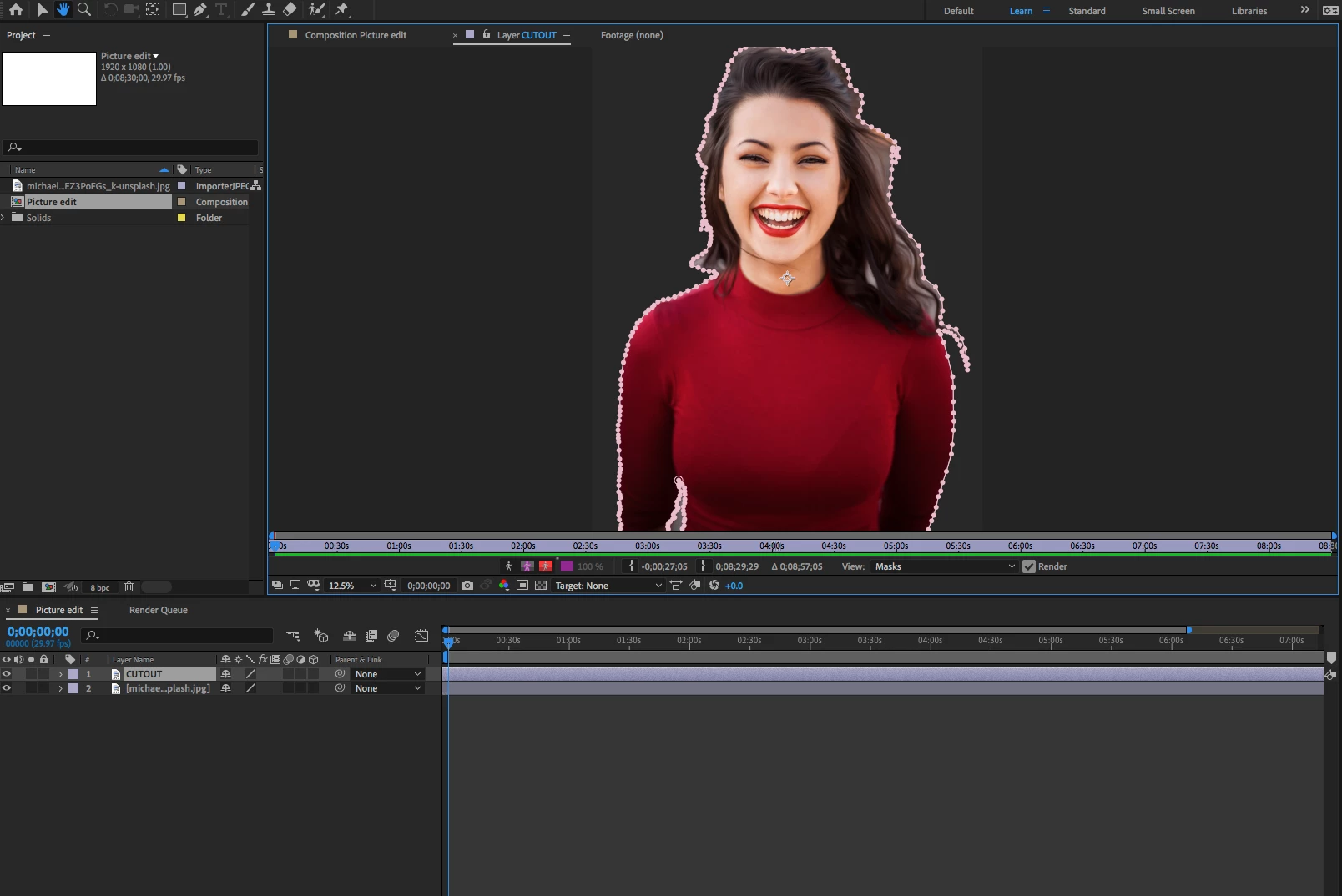
I have cut out a photo on After Effects using the pen tool (below).

I want to take this picture and export it into a different project.

I want to be able to resize the picture and have it move like text layers.

How do I do this?

Simple steps would be very helpful.

I am finding it hard to find anyone who can explain it clearly online without the need for an hour long tutorial video.
    This topic has been closed for replies.

    4 replies

    Participating Frequently
    July 26, 2019

    Thank you for the responses. I'm stumbling around in the dark over here, figuring it out as I go along, getting agitated with myself because, as you say, I don't know what ought to be the simplest of things.

    Anyway! Got there in the end!

    kirkeric
    Inspiring
    July 26, 2019

    Looks like you are making progress.  Maybe a bit much on the feathering around her head.  Don't feel too agitated, it can be overwhelming.  YouTube is your friend though.  Pretty much any beginner thing you need is there.


    Eric

    Participating Frequently
    July 26, 2019

    Yeah, I just showed it to someone and realised that the hazy 'feathering' around her hair is a bit rough... it was hard to cut out because all her hair is blowing.

    I'll go back in later and sort it.

    Thanks

    kirkeric
    Inspiring
    July 26, 2019

    Rick of course has the right answer but if you cut it out in AE, just render as a png and be sure to select full size on render to at least keep it the size you began with.  Then import the png file back in to project.

    Making it larger, well, increase the size.  That simple BUT, you will lose resolution as you get larger, pretty standard among anything.

    When you say a different project, do you mean a different comp?  These are most definitely entry level skills but will try to help best I can.

    Just copy and paste the layer in to another comp or drag the comp in to another comp.

    Eric

    Participating Frequently
    July 26, 2019

    I am trying to export it as a JPEG file, but the image keeps coming out the size below.

    How do I enlarge the space? How do I bounce the full bloomin' image?

    As you can see, After Effects is not my program...

    Community Expert
    July 26, 2019

    JPEG files do not have transparency. The easiest thing to do if this is a still image is to just cut it out in Photoshop. You'll get a better job in about 1/4 the time. Then you can simply animate the position. You can also save the AE project, open the new project, import the project where the masking is done, then just copy and paste the layer into a new comp or drag the whole comp where you cut out the actor into the new comp and animate position, scale, and rotation.

    These are extremely basic AE skills. There is nothing magic about anything. There are no fully automated buttons you can push to make this happen, If the image of the girl is not the right size when you bring it into After Effects and you have to make it bigger by scaling it up you need to find another image so you only have to scale it down. If you are intent on exporting the masked image as a still image then by far the easiest way to do that is to go to the Composition menu and Save the frame as a Layered PSD file, then import that to your new project. That is a lot easier than setting up a new custom output module and Render settings just to do something that can be done better using Photoshop.

    imeilfx
    Inspiring
    July 26, 2019

    If you need realy short and best answer here it is: Learn basics of After Effects.
    Anything else will take time to explain it to you.
    As for learning basics - you can start here: After Effects tutorials | Learn how to use After Effects
    As for explonation you can (I will skip that AE is not the best tool for cutting background from images):
    - export that graphics as a single frame with alpha channel and use it

    - save that project and import it into another
    - just work on your main composition and your graphics in one project

    Participating Frequently
    July 26, 2019

    I've already looked in there, and I wasted an hour trying to find what I'm after.

    I was supposed to have this done by 5.

    I need to bounce the full image to a jpeg with no background so I can insert it elsewhere and manipulate its size.