
ArctisStudio
Known Participant
January 31, 2023
Answered

How do I have a child layer follow a parent layer's current properties when it's nested?

  • January 31, 2023
  • 1 reply
  • 615 views

Hi everyone. I'm looking for a solution to an issue I'm having.


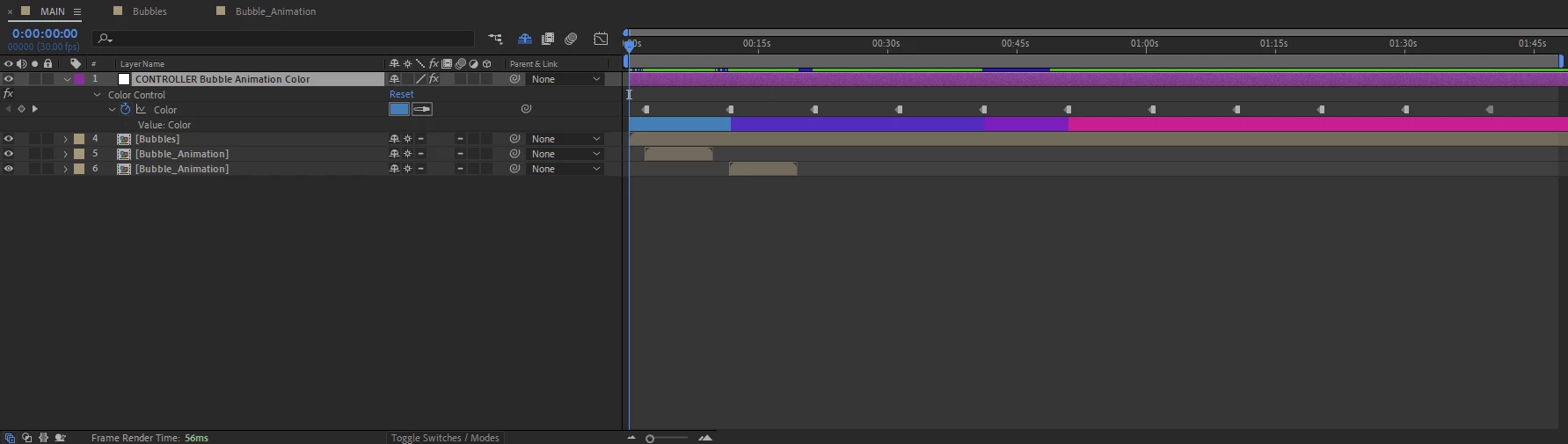
This is my main timeline. CONTROLLER  Bubble Animation Color is a null object with an expression color control effect applied and has color keyframes.

These are meant to colorize the shape layers contained in the Bubble_Animation precomp. In the image it's duplicated twice and the idea is for it to be duplicated a total of 11 times.
 

The Bubble_Animation comp contains these shapes. They have simple position keyframes. Each one has the same expression applied to their respective color properties, connecting them to the CONTROLLER  Bubble Animation Color null object in the main timeline.
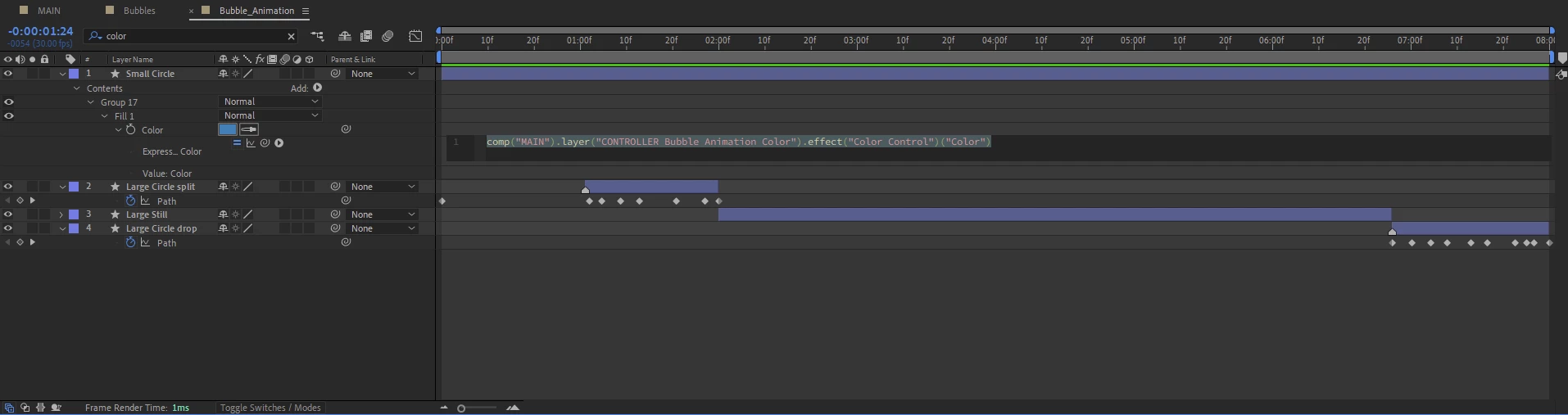
 

This doesn't work though. Since the Bubble_Animation comp doesn't know when it's being placed in the main timeline, the shapes adopt the color properties with the same timecode as their own. My goal is that they adopt the color property from CONTROLLER  Bubble Animation Color that is active at the current timecode of the MAIN timeline.


I haven't been able to find any resources whatsoever about this, I'd be very grateful for:

1. A general solution to my specific problem

and/or

2. An explaination of how to use expressions/techniques to avoid this issue in the future


Thanks in advance!


This topic has been closed for replies.
Correct answer Sarah Talbot

Since you are duplicating the comp multiple times, one idea I might try is to change your workflow so that your expression is on an Essential Property in your main comp, instead of referenceing "MAIN"from inside "Bubble_Animation" . So add the color control in "Bubble_Animation" to your Essential Graphics Panel, and then in "MAIN" pick whip the layer's essential property to your controller. 

I've noticed that essential properties don't always play well with time remapping, so I'd be wary of that if you need it.

1 reply

Sarah Talbot
Sarah TalbotCorrect answer
Participating Frequently
January 31, 2023

Since you are duplicating the comp multiple times, one idea I might try is to change your workflow so that your expression is on an Essential Property in your main comp, instead of referenceing "MAIN"from inside "Bubble_Animation" . So add the color control in "Bubble_Animation" to your Essential Graphics Panel, and then in "MAIN" pick whip the layer's essential property to your controller. 

I've noticed that essential properties don't always play well with time remapping, so I'd be wary of that if you need it.

ArctisStudio
Known Participant
January 31, 2023

WOW that works perfectly, thank you!

Another way I just found, which is a bit more crude, is to apply a color overlay blending mode to the layer and pickwhip that to the color controller. Your method is much better though.


Sarah Talbot
Participating Frequently
January 31, 2023

Awesome! Glad it's working for you! Sounds like your other solution was interesting too - similarly just getting your color change effect to happen in the main comp instead of the precomp!

My brain somtimes breaks a little when working between the "time" in nested comps, so essential properties have been a great tool for working across comps!