Answered
How do I make a slow motion effect for parts of a video?
I have seen videos showing how to make the entire video slow or faster, but I just want certain frames. For example: frame 4s to 6s of video to be slow instead of the entire video.

I have seen videos showing how to make the entire video slow or faster, but I just want certain frames. For example: frame 4s to 6s of video to be slow instead of the entire video.
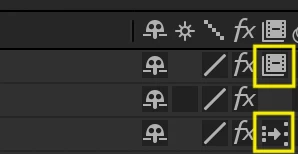
You have to activate the Time remapping options for your videos. Go to Layer > Time > Enable Time Remapping. Then, you can create keyframes at 4s and 6s marks. After that, if you move away these keyframes you can make the video slower. Don't forget to activate any of the frame blending options on the layer switches. If you click once, then After Effects will use the Frame Mix option. If you click twice you will use the Pixel Motion option, a lot better than the Frame Mix option. (Check attached image)
Already have an account? Login
Enter your E-mail address. We'll send you an e-mail with instructions to reset your password.
 AdChoices