Participant
January 26, 2022
Answered

How do I make my clips visible again?
  • January 26, 2022
  • 4 replies
  • 187 views

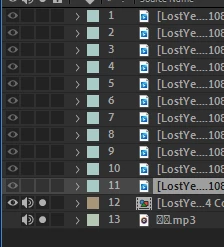
As you can see, all the "eye" logos on my other clips are tinted. I previously toggled them off to hide them, now I want them back. Any help please?

This topic has been closed for replies.
Correct answer Mylenium

Un-solo the audio layers. You may want to read the online help on basics like layer switches and all that.


After Effects User Guide


Mylenium

4 replies

Participant
January 27, 2022

Thank you so much (Mylenium's answer worked), its fixed!

Participant
January 26, 2022

You can assemble and rearrange sequences in one or more Timeline panels, where their clips, transitions, and effects are represented graphically. A sequence can consist of multiple video and audio tracks running parallel in a Timeline panel. I have tried it for my masks (link reoved by moderator) site.

Mylenium
MyleniumCorrect answer
Legend
January 26, 2022

Un-solo the audio layers. You may want to read the online help on basics like layer switches and all that.


After Effects User Guide


Mylenium

Community Expert
January 26, 2022

Hello:

Is the eye turned off inside of a precomp? If so you would need to go inside of the precomp to turn the eye back on.