Participant
March 6, 2021
Answered

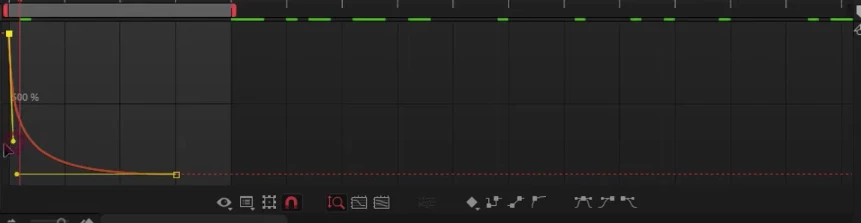
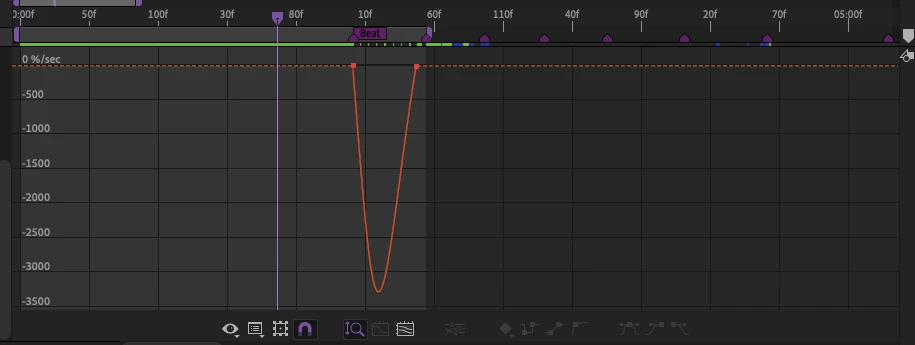
How do I make my graph editor to go from the first to the second picture?
  • March 6, 2021
  • 2 replies
  • 492 views

This topic has been closed for replies.
Correct answer Rick Gerard

You get a different-looking graph editor if you choose to edit the value graph or the speed graph. Your top screenshot is a speed graph showing values in percentage change over time. The second screenshot is a value graph showing scale animated from about 200% to zero. It takes a while to figure out what you are looking at and what graph works better to achieve the timing that you want. The graph editor is all about timing. Use the speed graph to adjust acceleration between values. Edit the Value graph to adjust the values.


 For Position, the speed graph is almost always the best choice. It looks like you are editing the Layer/Transform/Scale property. Personally, I would probably use the value graph to edit the scale because the speed graph won't let you know as much about what is happening over time. Maybe this quick tutorial I did will help you figure things out. 

2 replies

Rick GerardCommunity ExpertCorrect answer
Community Expert
March 7, 2021

You get a different-looking graph editor if you choose to edit the value graph or the speed graph. Your top screenshot is a speed graph showing values in percentage change over time. The second screenshot is a value graph showing scale animated from about 200% to zero. It takes a while to figure out what you are looking at and what graph works better to achieve the timing that you want. The graph editor is all about timing. Use the speed graph to adjust acceleration between values. Edit the Value graph to adjust the values.


 For Position, the speed graph is almost always the best choice. It looks like you are editing the Layer/Transform/Scale property. Personally, I would probably use the value graph to edit the scale because the speed graph won't let you know as much about what is happening over time. Maybe this quick tutorial I did will help you figure things out. 

Community Expert
March 6, 2021

Surely this School Of Motion publication will be very useful for you to understand well what you are seeing in the graph.

The MoGraph Secret Weapon: Using the Graph Editor in After Effects

Byron.