February 18, 2017
Answered

How do I organize Illustrator file for camera traveling?

  • February 18, 2017
  • 1 reply
  • 696 views

Hello!

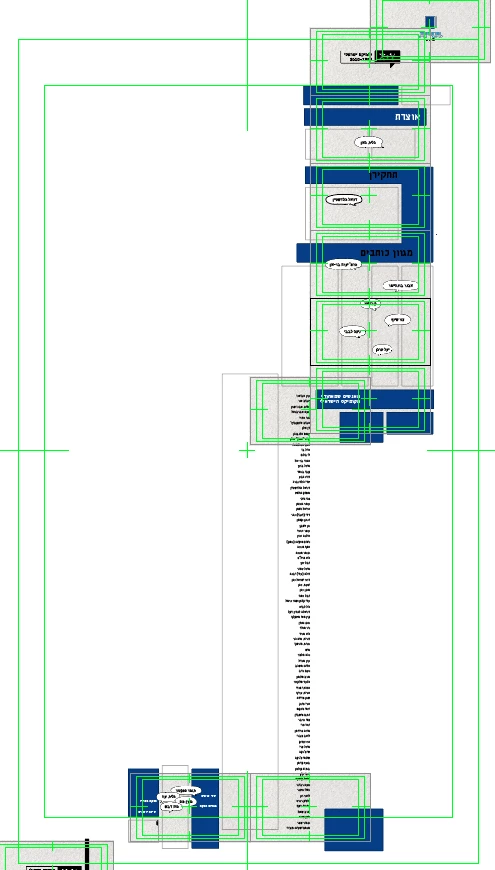
I would like to do a traveling camera over a big Illustrator file:

How do I organize the file for sending the camera to direct posions? until now I had to move it manually

By the way I'm using CC 2017

Thank you!

This topic has been closed for replies.
Correct answer Roei Tzoref

Hi Nir,

Rather then creating one large big scene in illustrates like you did, you will be better off compositing the scene in After Effects with separate elements. this will give you much more control because the timing is also derived from the exact composition of the different elements.

So the first thing you should do is prepare your design file to After Effects.

  1. Create a new HD1080 Preset in illustrator and arrange you different elements in that document as separate layers. everything that needs a separate animation, needs to be in a separate layer
  2. import your illustrator file as a Composition - Retain layer size, or Composition with footage dimensions set to layer size.

Now for the Animation, this is my favorite approach to hover over a large scene

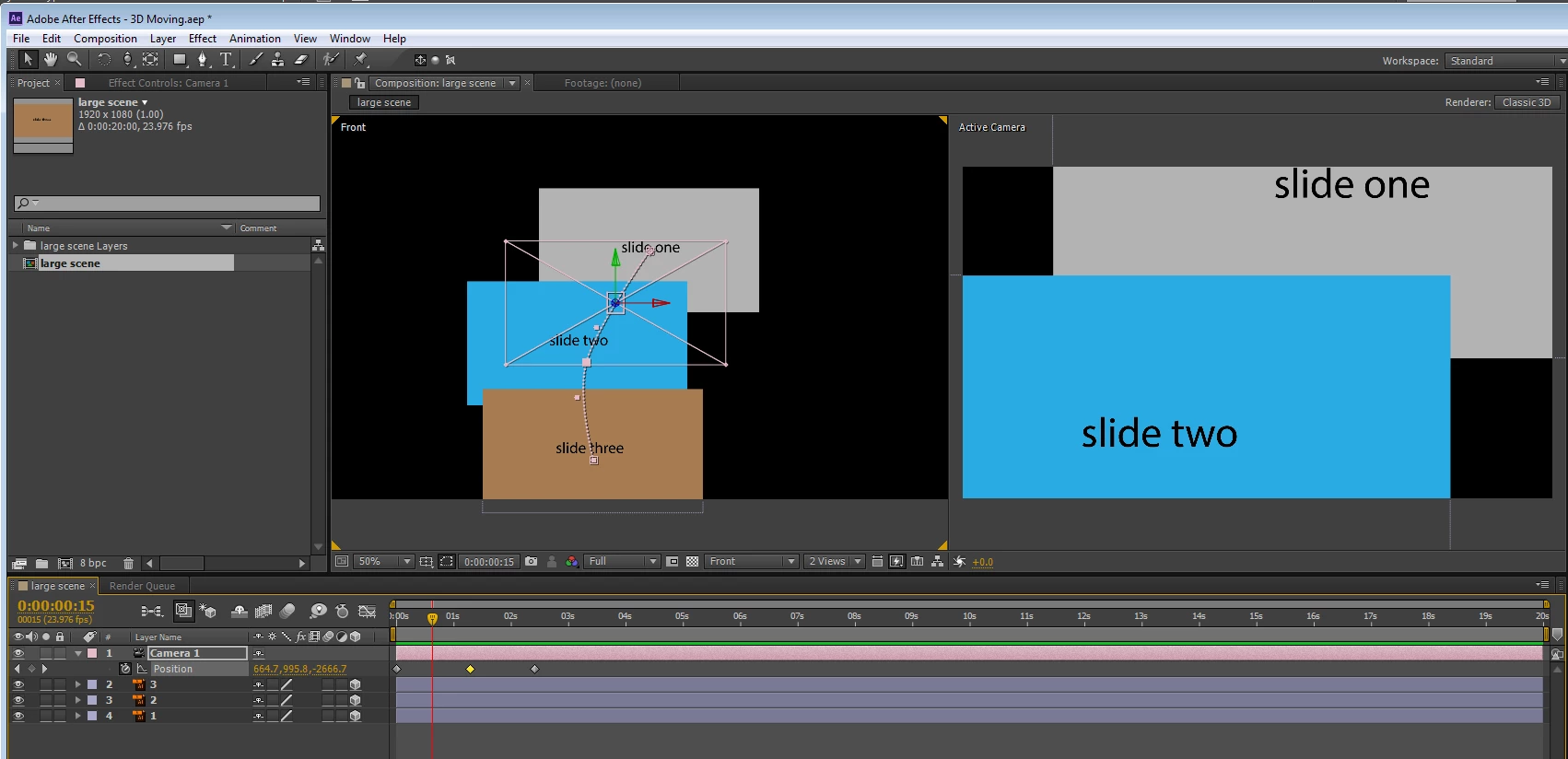
  1. set all your layers as 3D so you could use a virtual camera to hover over them.
  2. add a 50mm one node camera
  3. open a 2 views setup, set the other to "front" view
  4. in front view you can set up your view by using the track Z camera tool
  5. animate your camera in the front view while viewing the result in the active camera
If you want, you can use a rig to direct your camera to exact layer position:

  1. set the camera at it's default position
  2. right click on the camera->camera->create orbit null - this will create a rig for your camera that controls the camera from its field of view.
  3. now use the null to direct the camera to each layer's position by copying the position from the layer to the null

Here's a demonstration of this technique: Panning Large Scenes Using Target Layers in 3D - YouTube

Note: there are different tricks to make a continuous video (graphic or any other). it does not necessarily mean you need one camera through the whole scene. you should find interesting ways to cut between different scenes to simplify your project. take a look at this video that a student with the same question sent me yesterday: Retro Graphics Title Sequence - After Effects Template - YouTube  - see how the scene changes from a scene to the other - you don't need to control one camera through all of this, but find the proper place to make the transition. this will also make your project much more manageable and possibly more interesting.

Here's the project file for you to see how this works.

I converted the layers to shapes so you won't get missing files (you don't have do that if you want to use this technique);

HoverLargeScene.aep - Google Drive

1 reply

Roei Tzoref
Roei TzorefCorrect answer
Legend
February 18, 2017

Hi Nir,

Rather then creating one large big scene in illustrates like you did, you will be better off compositing the scene in After Effects with separate elements. this will give you much more control because the timing is also derived from the exact composition of the different elements.

So the first thing you should do is prepare your design file to After Effects.

  1. Create a new HD1080 Preset in illustrator and arrange you different elements in that document as separate layers. everything that needs a separate animation, needs to be in a separate layer
  2. import your illustrator file as a Composition - Retain layer size, or Composition with footage dimensions set to layer size.

Now for the Animation, this is my favorite approach to hover over a large scene

  1. set all your layers as 3D so you could use a virtual camera to hover over them.
  2. add a 50mm one node camera
  3. open a 2 views setup, set the other to "front" view
  4. in front view you can set up your view by using the track Z camera tool
  5. animate your camera in the front view while viewing the result in the active camera

If you want, you can use a rig to direct your camera to exact layer position:

  1. set the camera at it's default position
  2. right click on the camera->camera->create orbit null - this will create a rig for your camera that controls the camera from its field of view.
  3. now use the null to direct the camera to each layer's position by copying the position from the layer to the null

Here's a demonstration of this technique: Panning Large Scenes Using Target Layers in 3D - YouTube

Note: there are different tricks to make a continuous video (graphic or any other). it does not necessarily mean you need one camera through the whole scene. you should find interesting ways to cut between different scenes to simplify your project. take a look at this video that a student with the same question sent me yesterday: Retro Graphics Title Sequence - After Effects Template - YouTube  - see how the scene changes from a scene to the other - you don't need to control one camera through all of this, but find the proper place to make the transition. this will also make your project much more manageable and possibly more interesting.

Here's the project file for you to see how this works.

I converted the layers to shapes so you won't get missing files (you don't have do that if you want to use this technique);

HoverLargeScene.aep - Google Drive
February 18, 2017

Thank you for your answer!

I want to do big comics page, thats why I need one camera.

Roei Tzoref
Legend
February 18, 2017

Good luck and thanks for the feedback.