



annazhupynas
Participant
July 9, 2026
Question

How do I restore the check mark on the Closed function in After Effects?
  • July 9, 2026
  • 2 replies
  • 50 views
Photo 1

Hi,

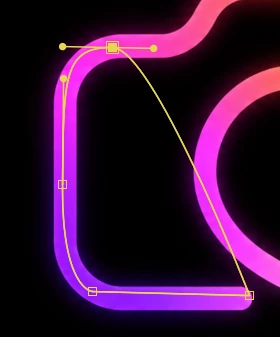
I created an animation using a Pen Tool (used the mask). After I made the animation, I noticed that, firstly, when creating a mask with Pen Tool, the mask options (Subtract, intersect, etc.) are not displayed; they are displayed only when, as you can see in the picture, the dots are closed. Secondly, when I tried to return the previous standard settings, or rather this checkbox, the dots closed.

Unfortunately, I don't understand how to deal with this problem and I would be grateful if you could tell me how to return the check mark.

Thank you!😊

    2 replies

    annazhupynas
    Participant
    July 10, 2026

    Thank you for your comment! I understand that the Mask tools can create two types of paths it’s open and closed. But that's not quite what I need to understand. In After Effects, I initially had the following settings: I select the Pen Tool, draw a mask, and a panel with mask settings (Suntract, Intersect, etc.) immediately appears. After I unchecked the box, meaning I opened the nodes, my mask settings changed. The mask options only appear when I close the nodes. I don't like this particular aspect. It's inconvenient. I can record a video and show you exactly what I'm doing. Thank you!

    thepixelsmith
    Community Expert
    Community Expert
    July 10, 2026

     “I select the Pen Tool, draw a mask, and a panel with mask settings (Suntract, Intersect, etc.)”

    Yes, the options you described (None, Add, Subtract, Intersect, etc) don’t appear as you are drawing they mask, they appear after you complete the mask by closing it. They appear only because you created a closed path.

     “After I unchecked the box, meaning I opened the nodes, my mask settings changed.”

    Mask and Path Option Menu

    I assume this is the option you are referring to? The command that converts a closed path into an open one?

    “The mask options only appear when I close the nodes.“

    Yes that is correct. Those options control how a mask affects the visibility of the layer it’s on. For example Add allows the mask to show the part of the layer it’s on while subtract hides it. 

    Only close path masks can have that “masking” effect, open path masks cannot.

    “I don't like this particular aspect. It's inconvenient.”

    What you like or think is inconvenient is irrelevant to how the program functions. 

    The question is why do you want or need these functions on an open path mask? What are you trying to achieve? What effect? More likely than not whatever you are trying to achieve can be done, but not by using masks this way.

    “I can record a video and show you exactly what I'm doing.”

    If you want to make a video go ahead. I don’t think the problem is with no understanding what you are doing. I think it’s more along the lines of the program doesn’t function the way you want it to.

    But maybe I am missing something.

    Jerron Smith | www.thepixelsmith.com
    thepixelsmith
    Community Expert
    Community Expert
    July 9, 2026

    There are two kind of paths (masks), open and closed. Only a closed path can actually show or hide parts of a layer. So an open path doesn’t have mask options like, add, subtract, etc
    This happens whether the path is mode with the pen tool in AE or in some other fashion.

    When you close a path either manually with the pen tool or with the right-click command, those options are available.

    I can’t tell from the one screen shot what you are trying to accomplish so I’m not sure what advice to give you.

    If you don’t want the mask to show/hide whats inside of it you can set it’s option to None. 

    Since I don’t understand what you are trying to accomplish I don’t understand what the problem you are trying to solve is.

    Jerron Smith | www.thepixelsmith.com
    annazhupynas
    Participant
    July 10, 2026

    Thank you for your reply! It was helpful! I'm trying to get the exact same settings back to the original. Initially, I had these settings: select the Pen Tool, make a mask, select the desired mask option (Subtract, Intersect, etc.), and then animate. I'd like to restore this look. Now, my settings are as follows: I make a mask, but the mask has no options (but as I said earlier, that's until I close the nodes). I don't want to have no options. Can you tell me how to fix this? And how can I avoid this problem if I need to reopen the nodes in the future? Thank you!

    thepixelsmith
    Community Expert
    Community Expert
    July 10, 2026

    As I said the Mask tools (Pen, Rectangle, Oval, etc) can make two types of paths, open and closed. A closed path is a shape while an open path is a line. Only a shape will have the options you want, a line cannot have them. 

    It’s not anything you did incorrectly. It’s the nature of mask paths in After Effects.

    Jerron Smith | www.thepixelsmith.com