maev_
Inspiring
February 3, 2024
Answered

How to achieve this animation?

  • February 3, 2024
  • 1 reply
  • 1070 views

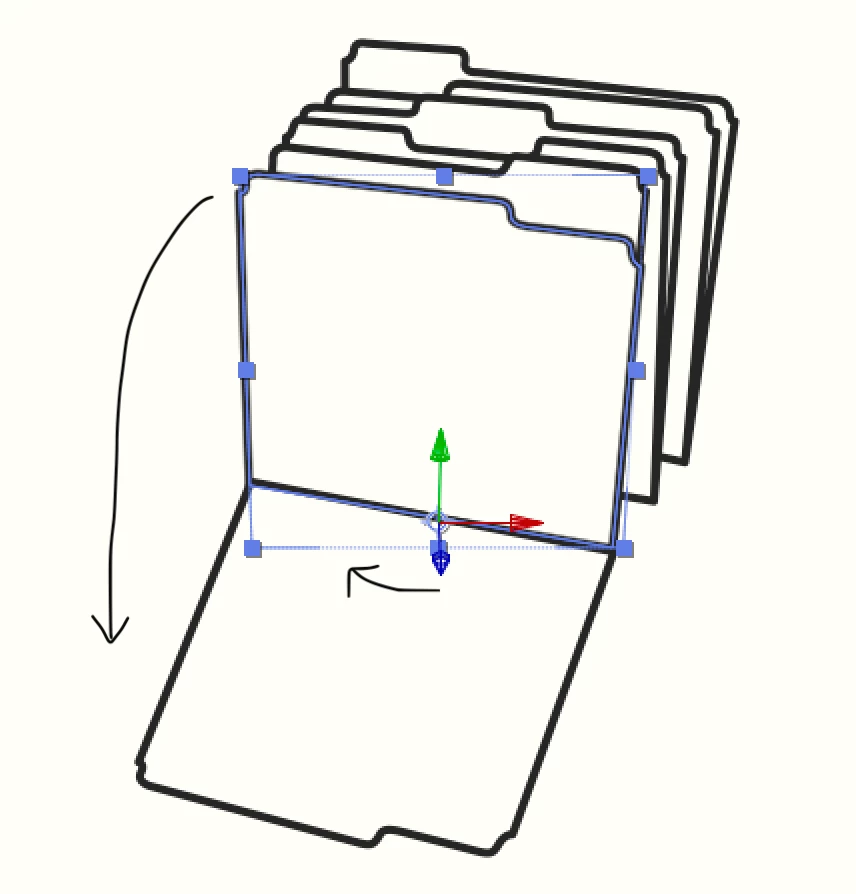
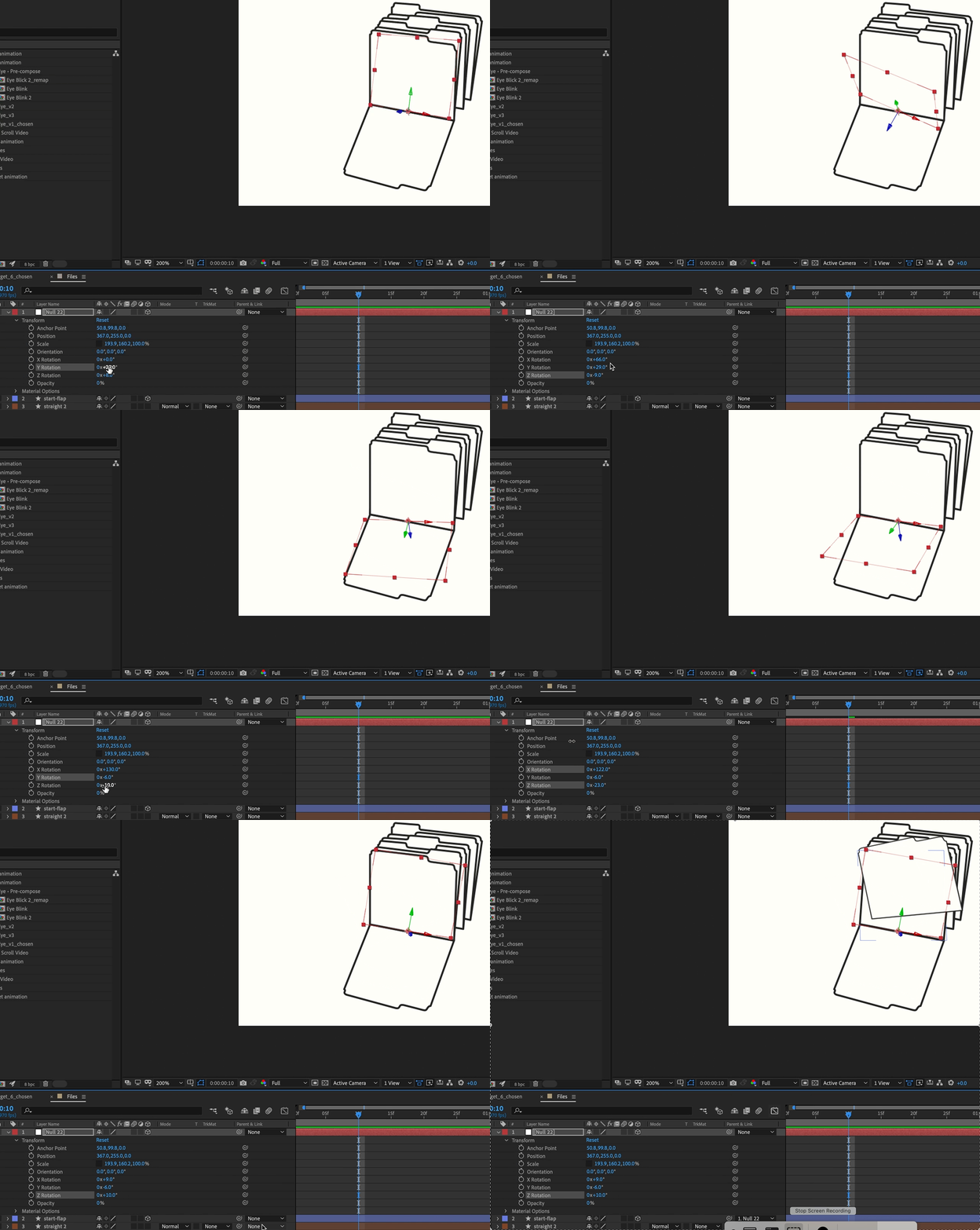
At first, my question was how to rotate the anchor point so that the z-axis faced the correct direction to hinge this folder face to be in the position below it. I read about creating a null layer and parenting to that. Honestly, that proved to be quite tedious (and unsuccessful), but also I wasn't able to set up the null positioning before parenting the layer without it then repositioning the child. (Both issues are shown below in the video.)


Then I thought that maybe I was going about this the wrong way, and that I should redraw the folders head on, rotate it from the head on perspective, then use a camera to show the 45° angle. Is this the correct way to appoach this? If so, I have two questions. 


  • How do I maintain the stroke width for the 3d layer? (An expression, maybe?)
  • How would I draw the sides of the folders for the camera rotation?


If this isn't the best method, is it possible to achieve this animation, of the folder hinging open, while maintaining the stroke with? Are there any other tricks or techniques? Thank you

This topic has been closed for replies.
Correct answer Rick Gerard

I oversimplified things without thinking about it very much. The solution I gave kind of works with straight lines but fails to take into account the perspective changes, and I failed to remember that the start and end tangents are parented to the vertices when you use the extended version of the Create Nulls from Paths script. It's going to take some more complicated math to get this to work with curved lines. Instead of simply using an L.toWorld([0, 0, 0]) function to attach a 2D point to a layer's 3D space, I'm going to need to calculate the distance from and the angle to the camera to adjust the position of the points for accurate 3D. I will then also need to calculate the change in position of the in and out handles based on the relationship between the path points and the 3D nulls they are following. The math is going to take some research, and I don't have time for that now. Maybe Dan Ebberts, one of the best expressions and scripting men in the world, will see this post and provide a quicker solution for the expressions.


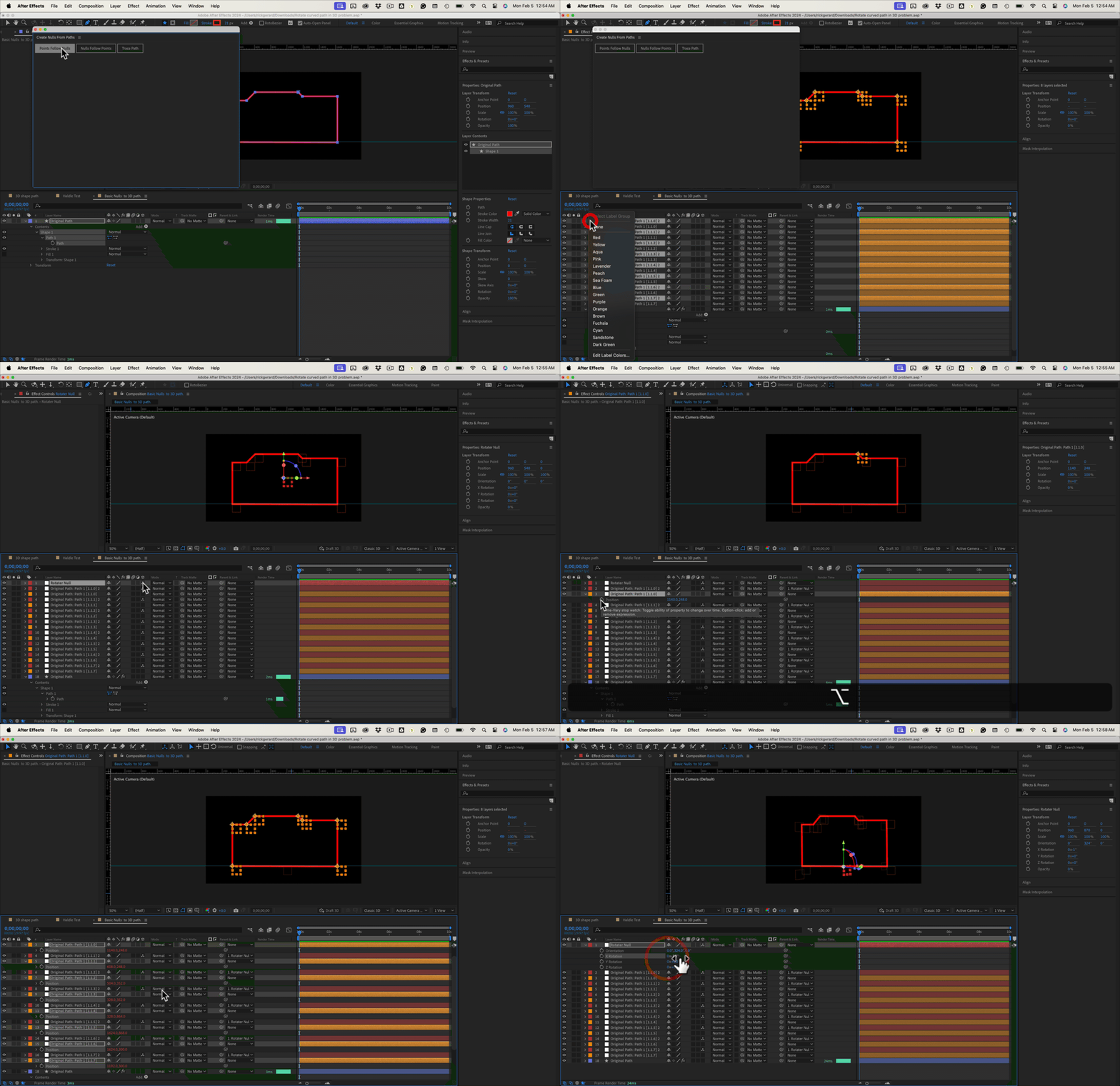
As far as the workflow to generate your 3D nulls for the Points with no curves, try this:

  1. Select the path and apply Points Follow Nulls to generate a new null for each point on the path
  2. Select all of the new paths (with Orange labels), duplicate them (Ctrl/Cmnd + D), Change the label color to red, and make them 3D
  3. Add a new Rotater Null and make it 3D, then position it at the center of rotation
  4. Select all the Red layers from the Label Group tab and Parent them to the Rotation null
  5. Select the first Orange Null created by the script and add the toWorld expression to it
  6. Use the file menu or right-click to Copy the expression only
  7. Select the Orange Label Group again and paste, verifying that the expression was added to all layers using the P key
  8. Manipulate the Rotation properties of the Rotater null


Selecting a label group and changing colors is done by right-clicking on the layer label.


You now have an orthographic 3D representation of a moving 3D layer. Orthographic means no perspective. 


If I figure out how to compensate for the camera and give you perspective, or better yet, figure out how to fix the curves problems with the start and end handles generated by Create Nulls From Paths Extended, I'll post the solution and probably create a tutorial.


The expression for this workflow:

L = thisComp.layer(index -1);
L.toWorld([0, 0, 0]);

Here's what the workflow looks like:
I hope this helps a bit.



1 reply

Community Expert
February 3, 2024

The folders you want to flip down must be drawn square to the camera. If you rotate in Y and then rotate in X, you will get weird motion along the X axis. Instead, change the Y orientation to put the illustration at an angle to the Acgive Camera the same way you would orient a folder on a real set. Then rotate in X to make the folder lie down.

3D layers are going to have perspective. To make the lines appear to have the same width, all you need to do is add a camera with a long lens to reduce the perspective shift. Perspective (vanishing point lines) is controlled by distance from the camera or camera position, framing is controlled by focal length. Try a 100 to 200-mm lens. 


If you want the lines to appear to have the same thickness as the folder rotates toward the camera, you will have to turn on the C4D rendering engine and extrude the lines to the same depth as the thickness of the lines.


The only other option would be to keep the layer 2D and use the Create Nulls from Paths script from the Window Menu to create a null for each point on the math using the Points Follow Nulls button. Then, create a set of duplicate nulls and shift parent each one to the appropriate null created by the script to snap them to the same 2D position. Next, remove the parenting, and make all of your rotate nulls 3D. 


You will have to use Create Nulls From Paths Extended if you want curves and also attach nulls to each vertex. With straight lines, the comp looks like this. 

I have arranged the 3D nulls below each of the nulls created by the script and added this simple expression to convert 3D space to 2D space for the nulls controlling the path.

L = thisComp.layer(index+1);
L.toComp([0, 0, 0])

The expression just looks at the layer 3D layer below it and converts 3D space to comp space.


I have uploaded an After Effects 2023 project file for you to fiddle with.

maev_
maev_Author
Inspiring
February 4, 2024

Thank you so much for your thorough response. I redrew the folders and created nulls using the Points Follow Nulls from the Extended version.


Would you mind sharing a quick gif on how to duplicate the nulls? And then I shift-parenting each duplicate to its corresponding null created by the 'Create Nulls... Extended'? Do I add the position expression to each scripted-null once shift-parented, and then removed? Honestly, a quick gif of those last steps would help immensely. I apologize for my ignorance, but I feel I'm almost there there thanks to you.


Rick GerardCommunity ExpertCorrect answer
Community Expert
February 5, 2024

I oversimplified things without thinking about it very much. The solution I gave kind of works with straight lines but fails to take into account the perspective changes, and I failed to remember that the start and end tangents are parented to the vertices when you use the extended version of the Create Nulls from Paths script. It's going to take some more complicated math to get this to work with curved lines. Instead of simply using an L.toWorld([0, 0, 0]) function to attach a 2D point to a layer's 3D space, I'm going to need to calculate the distance from and the angle to the camera to adjust the position of the points for accurate 3D. I will then also need to calculate the change in position of the in and out handles based on the relationship between the path points and the 3D nulls they are following. The math is going to take some research, and I don't have time for that now. Maybe Dan Ebberts, one of the best expressions and scripting men in the world, will see this post and provide a quicker solution for the expressions.


As far as the workflow to generate your 3D nulls for the Points with no curves, try this:

  1. Select the path and apply Points Follow Nulls to generate a new null for each point on the path
  2. Select all of the new paths (with Orange labels), duplicate them (Ctrl/Cmnd + D), Change the label color to red, and make them 3D
  3. Add a new Rotater Null and make it 3D, then position it at the center of rotation
  4. Select all the Red layers from the Label Group tab and Parent them to the Rotation null
  5. Select the first Orange Null created by the script and add the toWorld expression to it
  6. Use the file menu or right-click to Copy the expression only
  7. Select the Orange Label Group again and paste, verifying that the expression was added to all layers using the P key
  8. Manipulate the Rotation properties of the Rotater null


Selecting a label group and changing colors is done by right-clicking on the layer label.


You now have an orthographic 3D representation of a moving 3D layer. Orthographic means no perspective. 


If I figure out how to compensate for the camera and give you perspective, or better yet, figure out how to fix the curves problems with the start and end handles generated by Create Nulls From Paths Extended, I'll post the solution and probably create a tutorial.


The expression for this workflow:

L = thisComp.layer(index -1);
L.toWorld([0, 0, 0]);

Here's what the workflow looks like:

I hope this helps a bit.