
Answered
How to Apply an Expression to Multiple Layers at Once Using Automation Blocks
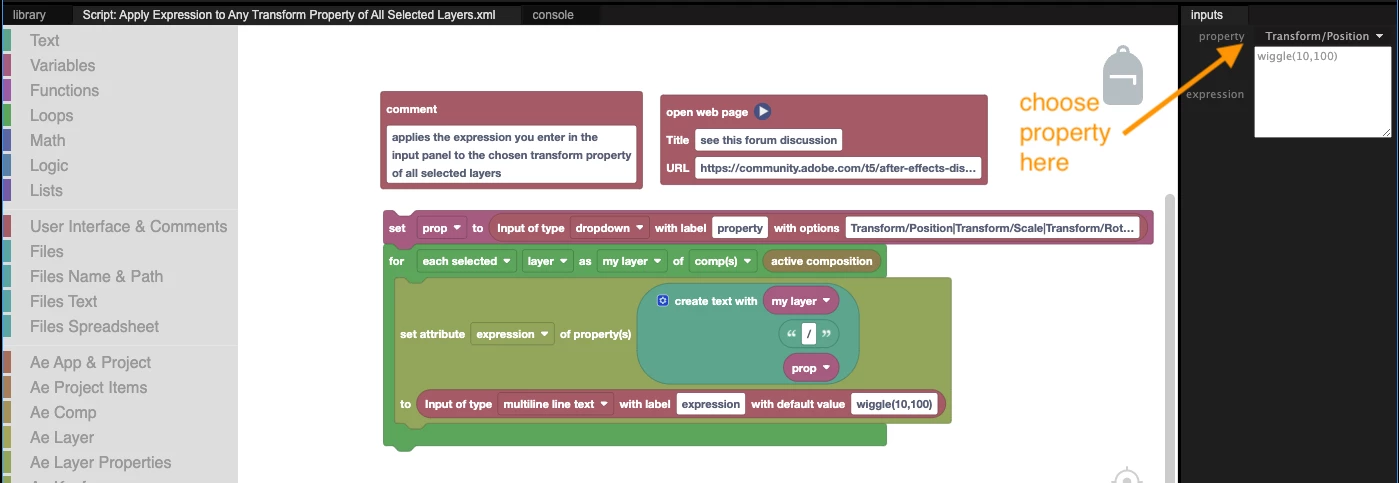
How can I apply an expression to multiple layers at once using Automation Blocks? I don't like manually copying and pasting the expression to each layer. I also don't want to open layers and select all properties manually. Instead, I want to enter the property name in a dropdown menu or input box and apply the expression to the selected layers' properties.
Example:
I select multiple layers and run the script. A dialog box opens where I enter the property name, such as "position" and the expression. Then, the script applies the expression to the specified property for all selected layers.
Has anyone done something similar or have suggestions on how to achieve this? I’d appreciate any guidance. Thanks in advance! 😊


 AdChoices