
Volition74au
Inspiring
May 18, 2025
Answered

How to Auto-Orient along path with a 3d Layer - Expressions

  • May 18, 2025
  • 1 reply
  • 460 views

I am trying to get a shape layer to orient along the path but i need to use expressions (i need it for a setting in stardust) .
I can get it working if the path rotates in only 1 direction using these expressions on either the x, y or z rotation)

delayT = framesToTime(effect("Orientation Delay")("Slider"));   // seconds

// Pilfered from dan Ebberts - https://www.motionscript.com/design-guide/auto-orient-y-only.html
p1 = thisComp.layer("Spin Controls")
             .toWorld(thisComp.layer("Emitter Light").transform.position, time);
p2 = thisComp.layer("Spin Controls")
             .toWorld(thisComp.layer("Emitter Light").transform.position,
                      time + delayT);

delta = p2 - p1;

// comment out the orientation required
xOrient = radiansToDegrees(Math.atan2(delta[2],delta[1])) + value;
// yOrient = radiansToDegrees(Math.atan2(delta[0],delta[2])) + value; 
// zOrient = radiansToDegrees(Math.atan2(delta[1],delta[0])) + value; 


However once i want to add say rotations in s axis the expressions breaksdown and behave strangely.
Does anyone have expressions where we can orient to the path? that works where all 3 axis work together? 

I've included a demonstration project using shape layer to show the problem. My expressions are on the purple shape layer and i have a pink shape layer that is parented and has "auto-orient" along path turned on. 
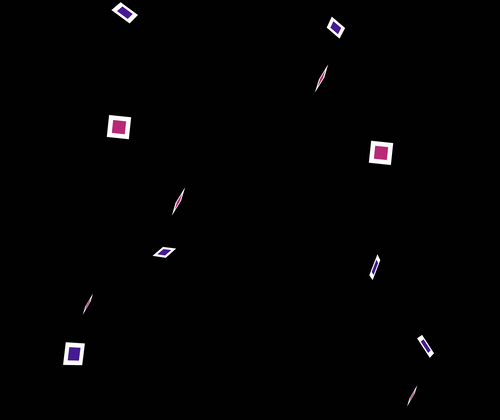
notice the purple layers weird flips and flutters

The world space transforms/vectors with the trig are just beyond me. help would be very appreciated
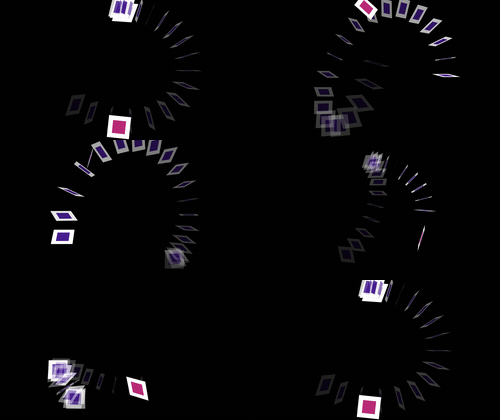
Correct answer Volition74au

I ended up solving it guys. No maths/trig/vectors either (luckily or else i wouldn;t have solved it)

delayT = framesToTime(effect("Orientation Delay")("Slider"));   // seconds

// 1. positions now and a moment later
p1 = thisComp.layer("Spin Controls")
             .toWorld(thisComp.layer("Emitter Light").transform.position, time);
p2 = thisComp.layer("Spin Controls")
             .toWorld(thisComp.layer("Emitter Light").transform.position,
                      time + delayT);

orient = lookAt(p1,p2);
// 2. comment out what you do not need
xRot = orient[0]; // x rotation
// yRot = orient[1]; // y rotation
// zRot = orient[2]; // z rotation


1 reply

Volition74au
Volition74auAuthorCorrect answer
Inspiring
May 18, 2025

I ended up solving it guys. No maths/trig/vectors either (luckily or else i wouldn;t have solved it)

delayT = framesToTime(effect("Orientation Delay")("Slider"));   // seconds

// 1. positions now and a moment later
p1 = thisComp.layer("Spin Controls")
             .toWorld(thisComp.layer("Emitter Light").transform.position, time);
p2 = thisComp.layer("Spin Controls")
             .toWorld(thisComp.layer("Emitter Light").transform.position,
                      time + delayT);

orient = lookAt(p1,p2);
// 2. comment out what you do not need
xRot = orient[0]; // x rotation
// yRot = orient[1]; // y rotation
// zRot = orient[2]; // z rotation


ShiveringCactus
Community Expert
Community Expert
May 19, 2025

Nicely done and thanks for coming back and sharing.