
Participating Frequently
August 22, 2023
Answered

how to avoid blue rectangled tipps that cover the UI randomly

  • August 22, 2023
  • 1 reply
  • 436 views

How to disable the blue "whats new" tooltips that happen to cover the UI randomly. I really could not care less, what obsolete new menues are now available in AFX. and they wont disappear by clicking into the UI or onto the blue recangle. only when hitting the tiny "ok" button. UX Design at its worst. 
This topic has been closed for replies.
Correct answer Kyle Hamrick

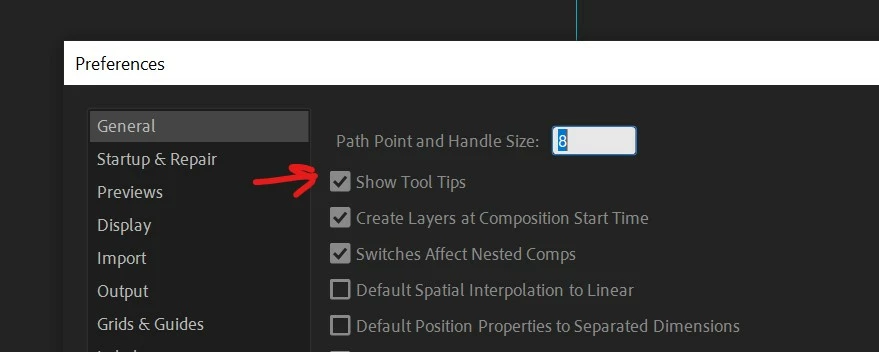
Very first item in your Preferences menu.

1 reply

Kyle Hamrick
Community Expert
Kyle HamrickCommunity ExpertCorrect answer
Community Expert
August 22, 2023

Very first item in your Preferences menu.

Participating Frequently
August 22, 2023

thanks a lot!

Participant
December 13, 2023

Actually Adobe conjured up a new way to repeatedly break your workflow: Coach Marks!


They are big blue balloon tooltips that specifically highlight new features, and the solution provided above does not hide them. You can disable them via Preferences > General > Enable Coach Marks almost at the bottom of the page.