

Ivaylo97
Participant
June 6, 2020
Answered

How to change language of text

  • June 6, 2020
  • 3 replies
  • 3416 views

Hello guys,


Is there a way to change the language of the entered text, for example from English to Bulgarian


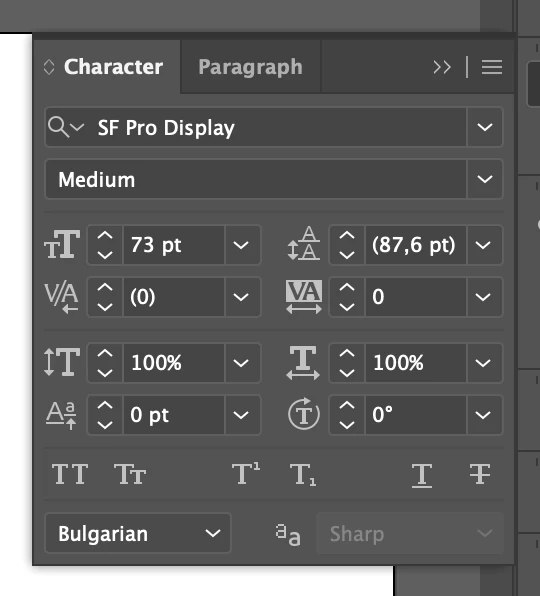
This is a screenshot from Illustrator. As you can see in the character, we have this option to change the input language. Here I putted it on Bulgarian.
 

Correct answer Mylenium

You have a misunderstanding here. You don't change the input language in AI, you just change the glyph sub-set used for contextual alternatives such as ligatures or letters that change the appearance when written in conjunction with other letters. that said, such features simply don't exist in AE. It uses a completely different text engine and will for the most part simply rely on correct settings on the operating system level to handle this.


Mylenium

3 replies

Participant
September 5, 2025

The topic is old, but I'll share my experience anyway, in case it's useful to someone. AE doesn't have this feature, but you can try adjusting the text in AI and then importing it to the appropriate place in AE. It works well for me, even with animated texts and effects. It slows down the workflow, but it's the only way I found.

Known Participant
October 23, 2024

I am Bulgarian, and also searching to the Bulgarian Cyrillic settings in After Effects, to no avail. 

Mylenium
MyleniumCorrect answer
Legend
June 6, 2020

You have a misunderstanding here. You don't change the input language in AI, you just change the glyph sub-set used for contextual alternatives such as ligatures or letters that change the appearance when written in conjunction with other letters. that said, such features simply don't exist in AE. It uses a completely different text engine and will for the most part simply rely on correct settings on the operating system level to handle this.


Mylenium

Ivaylo97
Ivaylo97Author
Participant
June 6, 2020

Thank you for your help. I did not know that.