
YuK1_Works
Inspiring
April 22, 2024
Answered

How to change Paragraph without changing its external position.

  • April 22, 2024
  • 2 replies
  • 821 views

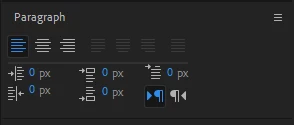
If I change the Left align text to Center text, it changes the apparent position of the text.
Is there any way to change the Paragraph without changing the apparent position?

 

This topic has been closed for replies.
Correct answer YuK1_Works

Rick Gerard-san's suggestion was appreciated, but since I wanted to apply it with static values, I decided to avoid Expression and develop a simple script.
The source code is provided below.

app.beginUndoGroup("Keep Position Center Align");

(function () {
  var comp = app.project.activeItem;

  if (!(comp instanceof CompItem)) return;

  var loop = comp.selectedLayers.length;

  for (var i = 0; i < loop; ++i) {
    var layer = comp.selectedLayers[i];
    if (!(layer instanceof TextLayer)) continue;

    var prop = layer.sourceText;
    var doc = prop.value;
    doc.justification = ParagraphJustification.CENTER_JUSTIFY;

    layer.sourceText.setValue(doc);

    var rect = layer.sourceRectAtTime(comp.time, false);
    var x = rect.left + rect.width / 2;
    var y = rect.top + rect.height / 2;

    layer.anchorPoint.setValue([x, y]);
  }
})();

app.endUndoGroup();

 I hope in the future I can do something similar with ctrl+click or shift+click.

2 replies

YuK1_Works
YuK1_WorksAuthorCorrect answer
Inspiring
April 23, 2024

Rick Gerard-san's suggestion was appreciated, but since I wanted to apply it with static values, I decided to avoid Expression and develop a simple script.
The source code is provided below.

app.beginUndoGroup("Keep Position Center Align");

(function () {
  var comp = app.project.activeItem;

  if (!(comp instanceof CompItem)) return;

  var loop = comp.selectedLayers.length;

  for (var i = 0; i < loop; ++i) {
    var layer = comp.selectedLayers[i];
    if (!(layer instanceof TextLayer)) continue;

    var prop = layer.sourceText;
    var doc = prop.value;
    doc.justification = ParagraphJustification.CENTER_JUSTIFY;

    layer.sourceText.setValue(doc);

    var rect = layer.sourceRectAtTime(comp.time, false);
    var x = rect.left + rect.width / 2;
    var y = rect.top + rect.height / 2;

    layer.anchorPoint.setValue([x, y]);
  }
})();

app.endUndoGroup();

 I hope in the future I can do something similar with ctrl+click or shift+click.

Community Expert
April 22, 2024

Add this expression to the Text layer's Anchor Point:


box = sourceRectAtTime();
[box.width/2 + box.left, box.height/2 + box.top]


This will center the anchor point on the text layer.


You can change the expression to put the anchor point on any corner of the text layer (or paragraph text). This expression will put the anchor point at the bottom left corner of the text layer:


box = sourceRectAtTime();
[box.left, box.height + box.top]


This one puts the anchor point at the top left corner of the text layer:


box = sourceRectAtTime();
[box.left, box.top]


You can probably figure out the other corners. Variations of this expression will give you a text layer that does not move when you change any of the Paragraph settings and locks the anchor point to any corner or the center of the text layer.


If you use the last expression example to put the anchor point at the top left corner of the text, this expression will move the layer into its default position from the left side of the comp in 20 frames. It will rest there until 10 frames before the end of the layer and then move out of the frame from its current position to the bottom of the frame.  I use this kind of thing all the time.

t = time - inPoint;
dur = outPoint - inPoint;
box = sourceRectAtTime();
strt = [-box.width, value[1]];
rest = value;
endPos = value[1] - box.height + thisComp.height;
mov1 = framesToTime(20);
mov2 = framesToTime(10);
pause = outPoint - inPoint - mov2;
easeIn(t, 0, mov1, strt, rest) +
easeOut(t, pause, pause+mov2, [0,0],[0, endPos])