
Participant
June 25, 2020
Question

How to change project icon?

  • June 25, 2020
  • 1 reply
  • 1362 views

     Hello! I have a problem, i had AE 2017 and AE 2020 on my mac. I changed default app from ae 20 to ae 17 because of reasons, and after that ALL ICONS of After Effects project files changes from default AE square to some weird AE square on a piece of paper:
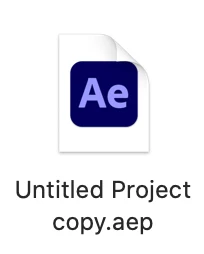
 I deleted AE 2017 and this didn't solve the problem. Today i deleted AE 2020 and re installed it again, didn't help. I tryed to google this issue - but all i found was "how to change AE APP icon, not project files icon. 

For example, premiere pro icons and AI icons are fine:

 Anyone have some solution? All works fine but this icon is ugly, and i dont like it.
Thanks for your response.
And im sorry for grammar, im not native speaker. 

This topic has been closed for replies.

1 reply

afk.anxrchy
Inspiring
June 3, 2022

Did you fix it?

PanaceaxdAuthor
Participant
June 5, 2022

Still no 😞

afk.anxrchy
Inspiring
June 5, 2022

Well, yesterday I found a workaround to fix it. I installed this app called Resource Hacker and launched it. after that I opened After Effects in it (AfterFX.exe).

Then opened the Icon Group folder and went through each one tryna search the icon for .aep files. (For me it was 1001, pretty sure it would be the same for you)

After that I deleted all the icons but 1001 (.aep icon)

After following all these steps, go to File>Save as (make sure you click save as and not save).

Then you can save it in the same location as your AE in Support Files with a file name that is not the same as AfterFX, perhaps AfterFX_aep or something. Now all you gotta do is open the properties of any .aep file and make sure the application they're using to open it is the new AfterFX (AfterFX_aep).

Now you can hit Apply and then OK. After all of this, now you will have the .aep icon for the .aep files and would also open AE when opened. Hope you found this helpful! Enjoy! Have a great day and take care!