
Matthias Guntrum
Participant
May 20, 2014
Question

How to check if a internal modal dialog is open?

  • May 20, 2014
  • 4 replies
  • 2051 views

Hey Folks,

I am using a app.scheduleTask as an interval to look if the contents of a folder have changed in the background.

This works well enough but if the user opens up an internal modal dialog (e.g. compositions settings), AE throws an error:
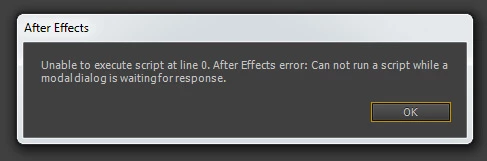
I have not been able to find any system event or variable to check if AE is currently busy with a modal dialog.

At the moment the user needs to restart the complete script, since the error stops the script from further execution.

Is there any option to check for modal dialogs?

Otherwise app.scheduleTask is pretty flawed as it causes every script to break if the user enters a modal dialog.

Cheers,

Matthias

This topic has been closed for replies.

4 replies

annap90227144
Inspiring
April 17, 2019

Well, I think solution to this Modal Dialog thing cannot be solved via script as any script is immediately terminated as soon as there is some Modal Dialog issue (ehm, talking/meaning specifically "perpetual" app.scheduleTask() which becomes automatically broken this way that is it won't continue once Modal Dialog issue is gone)

Alex White
Legend
June 22, 2018

You can use

app.isUISuppressed

to check whether there is a dialog active,

annap90227144
Inspiring
April 17, 2019

But according to http://docs.aenhancers.com/  there is no such option for app object?

Anyway, it works as long it is FALSE, but once it should be TRUE nothing happens because of...the exact problem it was testing against: "Can not run a script while a modal dialog is waiting for response" LOL, so no use I would say cos the script is simply never fired up once it is TRUE thus it has no way to check it.

I did try it this way (dos not work, of course: once TRUE it breaks the code so it does not even get to this statement):

var checkTask = app.scheduleTask("if(!app.isUISuppressed){check();}", 5000, true);

pierre-emmanuell7312945
Participant
June 20, 2018

Same problem here, when using app.scheduleTask() .

By only using app.scheduleTask('anEmptyFunction()', 200, true); with `function anEmptyFunction() { }`, It happens that I get that error if I do open some other projects.

Is it possible to get the error message of an hidden internal modal ?

Inspiring
May 20, 2014

To prevent this error from showing up, you will need to use a try{}catch(e){} in your code.

As to keep the scheduled task running there is nothing you can do (since CC) as you could have used a flash timer in CS5/6.

More here :

Matthias Guntrum
Participant
May 20, 2014

Hi,

thanks for the quick reply.

Sadly, adding a try and catch around the app.schedule code didn't do the trick.

app.scheduleTask('try{ check(); }catch(e){}',2000,true);

This will still stop the script from execution and result in the same error message.

The flash timer thingy is a nice idea but I need AECC support.

Cheers,

Matthias

Participant
March 14, 2018

Has anyone been able to find a solution to this? Problem still persists in CC.