
Participant
May 17, 2019
Question

How to check if entire text are fit in "addBoxText" layer by scripting

  • May 17, 2019
  • 1 reply
  • 557 views

Hi guys. I have an issue, I've added different text to composition from JSON file by "addBoxText" method. But sometimes not everything is visible:
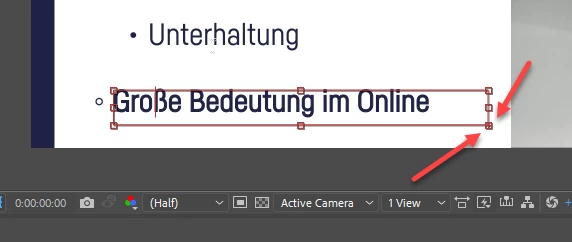
How to let my application to know if not everything is fit that I want.

Thanks for the help!

This topic has been closed for replies.

1 reply

Justin Taylor-Hyper Brew
Community Expert
Community Expert
May 17, 2019

Not sure if there's a way to tell if it's visible without doing a bunch of math comparing the font size to the sourceRect and value length, but then you'd have to factor scale and kerning and all those variables which will get pretty complicated.

Instead, I'd suggest finding the max character limit of your box, and then have your script alert you or do some other operation if the string length is too long.

Also, make your text bounding box as large as possible or convert to Point Text so it doesn't get cut off.

Participant
May 20, 2019

Unfortunately, I can't change leading or kernel - it will destroy style guide. If the last line will not fit in this shot - the last line will be moved to the next shot, and so on.

Theoretically, if we see little "+" if right bottom corner that says us - "Ahhh man! Too much text!!! ", so it's mean that we can get this information. But its question to the Adobe Developers - they need to implement this feature in scripting "library".

Tomas B. aka Tom10
Inspiring
May 21, 2019

Hey Nazar, some things to consider:

1. What would you do, if you find out that text does not fit? What would be solution for that? Based on what you mentioned, it should go to next line, but then - how about margins / safe areas below?

2. Is there any particular reason why you chosen Text Area instead of Text Tool?

3. How huge vertically Text Area box could be for this and other cases? Assuming there are texts in other bullet points as well.

Cheers!