

Richard Rosenman
Inspiring
December 7, 2022
Question

How to compile my Mac After Effects plugins for M1?

  • December 7, 2022
  • 3 replies
  • 1714 views

Hi gang;


I am not a Mac user and as such, my knowledge is limited. What I do know is that it's WAY more finicky than PC's. As an example, I have a client that can't use one of my plugins on his new M1 Mac running Montery 12.4. I assume, unlike PCs, the plugin needs to be recompiled somehow to be compatible with the M1.


I compiled my Mac plugin on an older laptop running an older OS about a year or two ago. I can't recall off the top of my head which one. But what are the steps? Do I need to first update my Mac OS to the latest the laptop will accept? Then recompile my plugin? Is there any specific setting I need to use for M1 compatibility? What if my laptop cannot be upgraded to the latest Mac OS? Do I need to use a particular SDK version?


This is the error message my client sent me:
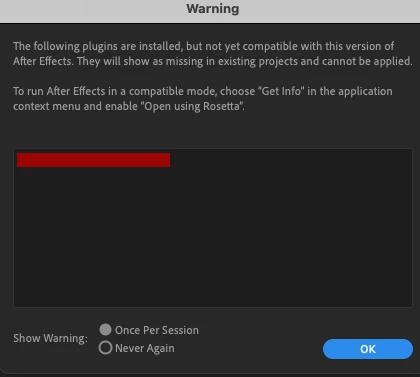
 

Any help would be appreciated. 


Thanks,

-Richard

This topic has been closed for replies.

3 replies

James Whiffin
Legend
December 8, 2022

Generally you want to compile against the lowest SDK you can so that it has maximum compatibility with the most amount of systems. I believe you can compile a universal binary for mac going back to 11.3 for the apple silicon, and way back to 10.x for the intel version. Any new-ish version of macOS / Xcode should be able to do this. 

Richard Rosenman
Inspiring
December 8, 2022

Hi James!


Thanks for your reply. Well, I'm still using the CS6 SDK so I guess I've got that part covered but I still don't know how exactly I'm supposed to compile for the Mac M1 native support.


Is this something that I do in Xcode specifically? Like a specific setting? Any clues on what / where? jamesastro 

posted a link in his answer to add universal binary support, and this seems to be what you're referring to. Is that step what I need to do?


Is there anything I need to add to the C++ plugin project?


Also, if I compile for native M1 does that mean my plugins won't be compatible on non-M1 Macs?


Any specifics would be welcome from everyone on how to do this.


Thanks,

-Richard

Inspiring
December 8, 2022

It's surprisingly easy to do this, or at least it was for my plugins:

1) Use Xcode 12.2 or later.

2) It'll automatically upgrade your project, adding a target for "Any Mac (Apple Silicon, Intel)".

3) Choose that target near the top-middle of the Xcode screen.

4) The document that I linked to earlier tells you how to upgrade your .r file.

5) Avoid throwing C++ exceptions through C functions. (Once again, see the document referred to earlier.)

6) Build your app using Product > Archive.

It'll build a universal binary that'll run on both Intel and Apple Silicon.


Good luck!

ToolfarmJP
Community Expert
Community Expert
December 8, 2022

This link might be helpful.


https://developer.adobe.com/after-effects/


Inspiring
December 7, 2022