
Known Participant
February 23, 2023
Question

How to continue an animation between compositions in After Effects?

  • February 23, 2023
  • 1 reply
  • 484 views

How can I seamlessly continue my animation in After Effects from one composition to another while maintaining the same animation?


Example: how can I make this square continue to the next composition?
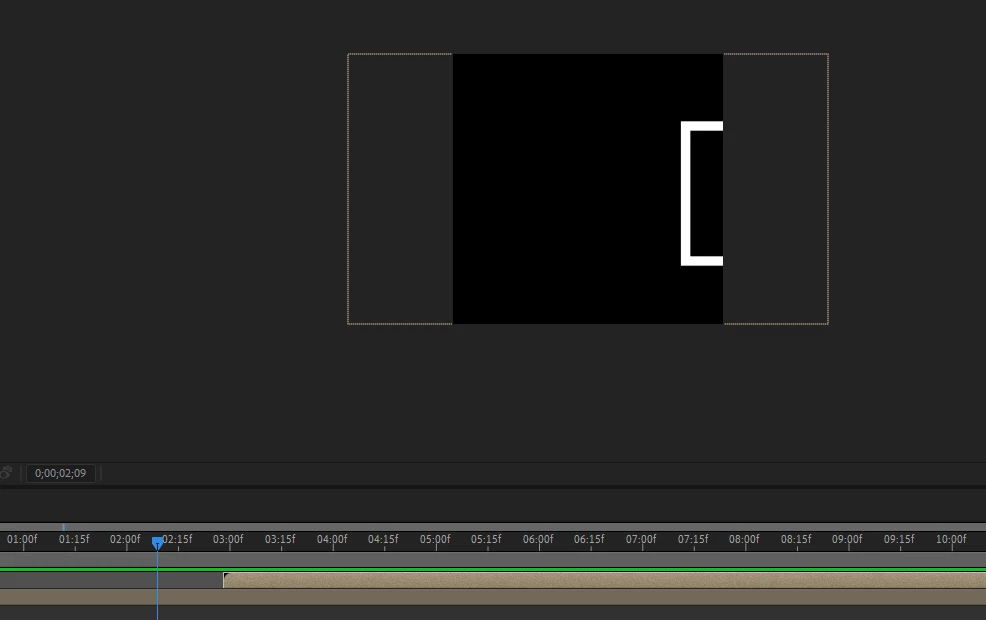
Noticed that my square is extending beyond the composition using the position keyframe. I want to know how I can continue the position keyframes to connect to the other composition. I'm not entirely confident in explaining this as I'm new to using After Effects.


Any advice on this matter would be greatly appreciative.


Thanks, 


This topic has been closed for replies.

1 reply

Community Expert
February 23, 2023

All you have to do is copy the layer and paste it into a new composition, then keep the same speed in the move and adjust the layer's position in the timeline. I do this kind of thing all the time when I have two shots that need to match up when they are cut together seamlessly. I rarely have more than one shot in a comp, but I often have moving elements that must continue to the new comp. 


Another option is to open the composition settings, extend the length of the comp long enough to include all of the movement in the problem layer, then Split the layer, or layers where you want the new comp to begin, duplicate the comp in the Project Panel, then set the work area to the cut points and trim the comps to the work area. This will give you seamless edits between compositions. 


If those suggestions don't make any sense, we need to see the modified properties of the problem layers (select and press 'uu'), and we need a description of the action in the scene. 

GoGraphixAuthor
Known Participant
February 25, 2023
Thanks for the follow-up. It works!

regards,


*Anthony Lucifero*
Graphic Designer / Brand Stylist
514.830.1874