
Inspiring
October 11, 2019
Answered

how to convert mac file to windows file

  • October 11, 2019
  • 3 replies
  • 7342 views

Hello I am trying to work on my after effects project for school. My school uses macs, but I use a windows laptop and I forgot to save my file to be compatible with my computer and now I am getting an error message as shown in this image. 
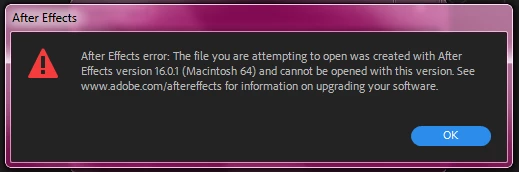
Is it possible to convert my file from CC 15.x to CC 14.x from my laptop? I likely won't be able to go to school to fix this issue by re-saving at a school computer. Help?

    This topic has been closed for replies.
    Correct answer Andrew Yoole

    Correction: your project file is version 16 (the currwent version) not 15.

    I'm only going by your own comment that your own system is version 14.  Please post a screen grab of the Creative Cloud CC application manager with After Effects visible.


    If your CC subscription is current and up to date, you should have no issue installing version 16 UNLESS your hardware is not capable of running it. Please post your hardware specs including CPU, GPU, RAM etc.


    But your issue is now more complicated because if you DO have to revert from 16 to 14, you can't do that in one step.  You will need to open the project in 16, save in 15 format, then open in 15 and save in 14 format.  After Effects only allows you to save one generation backward.

    3 replies

    Andrew Yoole
    Inspiring
    October 12, 2019

    As a follow up to this thread, I provided kk4pups with a 14.0 version of his project file that was useable.  


    But in doing that I learned something myself, so a bit of self correction here:  the current version of AE allows you to save two steps back, not one.  So AE 16 can save  both version 14 and 15 format project files.

    Andrew Yoole
    Inspiring
    October 11, 2019

    Read my reply above to explain the situation.  But in the meantime, I will PM you an email address.  If you send me the project file I'll convert it to version 14 for you.

    Participant
    May 12, 2023

    Hi Andrew,

    I'm having a similar problem. Do you think you could help me convert the file as well? I have the latest AE installed on my MacBook but the project I made at school was on a dell computer. It will not let me open the file. Any chance you can help me out? I would appreciate it a lot. 

    Andrew Yoole
    Inspiring
    October 11, 2019

    The issue has nothing to do with Mac or PC.  After Effects projects are platform agnostic.


    Your issue is that your school is using a newer version of AE.  The only way to fix the issue is to open the project on a computer that has 15.x installed, then save a copy in 14.x format under the Save As dialog.  


    Are you able tu update your home copy of AE to a newer version?

    kk4pupsAuthor
    Inspiring
    October 11, 2019
    According to creative cloud my AE is up to date? I don't know what to do.
    Andrew Yoole
    Andrew YooleCorrect answer
    Inspiring
    October 11, 2019

    Correction: your project file is version 16 (the currwent version) not 15.

    I'm only going by your own comment that your own system is version 14.  Please post a screen grab of the Creative Cloud CC application manager with After Effects visible.


    If your CC subscription is current and up to date, you should have no issue installing version 16 UNLESS your hardware is not capable of running it. Please post your hardware specs including CPU, GPU, RAM etc.


    But your issue is now more complicated because if you DO have to revert from 16 to 14, you can't do that in one step.  You will need to open the project in 16, save in 15 format, then open in 15 and save in 14 format.  After Effects only allows you to save one generation backward.