


Known Participant
Jan 31, 2025 8:30 PM UTC
Answered

How to create Create dropdown list with icons in ExtendScript

Hi! Does anyone know how to create a dropdown with an icon in ExtendScript?
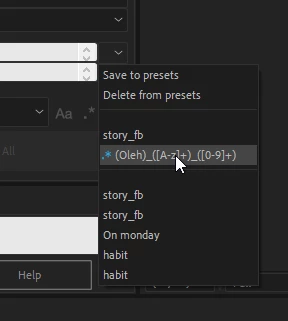
I saw this in a regular script (not an extension) and I really want to know how!

Here is the example of what i saw, as you can see, there is an blue image icon in the list itself
Aaron CobbCorrect answer
Inspiring
Feb 2, 2025 9:40 PM UTC

Each ListItem has a .icon property. Load a PNG using File(<URI>) and assign that file to the .icon property, and when you show your dropdown list the icon should be there.

4 replies

Kevin J. Monahan Jr.
Legend
Feb 1, 2025 1:27 AM UTC

Hi @,

See if this tutorial might give you the info for this: https://adobe.ly/4hFJW1w

I hope it helps. Please let us know if it does.


Thanks,
Kevin


Translate
Kevin Monahan - Sr. Community and Engagement Strategist – Adobe Pro Video and Audio
Known Participant
Feb 1, 2025 9:35 AM UTC

Unfortunately, I have already seen this video, it talks about icons in regular buttons, but there is no information about the list menu items

Translate
Aaron CobbCorrect answer
Inspiring
Feb 2, 2025 9:40 PM UTC

Each ListItem has a .icon property. Load a PNG using File(<URI>) and assign that file to the .icon property, and when you show your dropdown list the icon should be there.

Translate