


Participant
November 8, 2023
Question

How to delete Tracking points
  • November 8, 2023
  • 1 reply
  • 202 views

Hello,
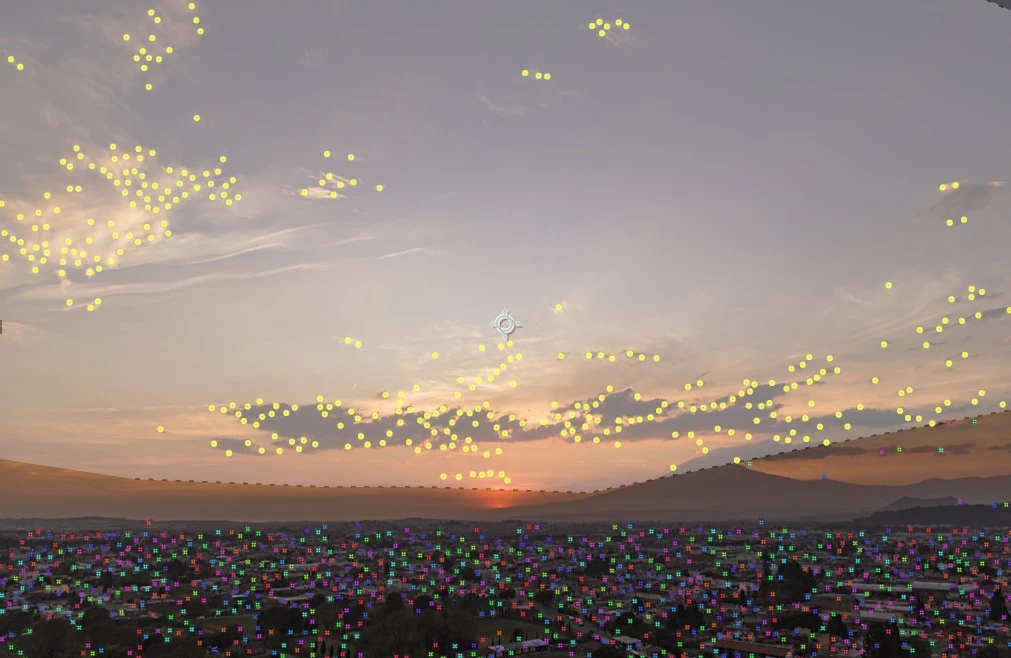
I want to stabilize timelapse footage with the Warp stabilzer, the problem ist that it is also Tracking the clouds. So i delete the Tracking Points from the sky, like you can See in the picture. But i can only delete them frame by frame, which takes forever at around 1000 Frames. I want to delete all the Tracking points in the grey area For the whole clip. Thanks a lot

This topic has been closed for replies.

1 reply

Community Expert
November 9, 2023

Create a rough mask that hides the sky, pre-compose the footage and make sure that you move all attributes to the new comp and trim the comp to the layer length. Now run Warp Stabilizer on the Pre-comp. After stabilizing, open the Pre-comp and turn off the mask. Then return to the Main comp and Pre-render the comp before you add any more effects or layers. You will find Pre-render in the Composition Menu. This will reduce the AEP file size, improve stability, and shorten your final render time.