

yash-lucid
Inspiring
April 1, 2025
Question

How to export a position property for Essential Graphics - but with a limit on position

  • April 1, 2025
  • 1 reply
  • 293 views

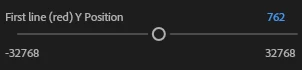
So when I add the option to move the Y Pos of a text layer, moving the slider a few pixels makes it go completely off screen, since the ends are -32768 and 32768, whereas my sequence/timeline is 1920x1080.


So how can I add a position slider, without such a crazy range, so that the slider moves in a more intuitive way?


1 reply

Theresa Rostek
Community Manager
Community Manager
April 4, 2025

Hi @yash-lucid,


You'll want to connect this property to a Slider Control.


Add a Slider Control (effect -> Expression Controls -> Slider Control) to your text layer.

Enable expressions on your Y Position (alt + click on the stopwatch), then pickwhip to the Slider Control.

Your text will disappear since now it's being fed a 0 Y Position. Change the Slider control to the pre-expression value of the Y Position.

Add your Slider Control to the Essential Graphics Panel, click edit to change the range.


Theresa

Motion Graphics, Premiere Pro
yash-lucid
Inspiring
April 4, 2025

Thanks I'll give it a try